Ransomware Incident Response Checklist: What to Do in the First 60 Minutes
The first 60 minutes of a ransomware attack can determine how far the incident spreads. Learn how to prioritize detection, isolation, identity control, investigation, and communication with a practical ransomware response checklist.
A ransomware attack does not become dangerous when the ransom note appears. By then, an attacker may already have compromised credentials, established persistence, moved between systems, or accessed sensitive data.
IBM's 2025 Cost of a Data Breach Report found that organizations took an average of 241 days to identify and contain a breach, although faster identification and containment helped reduce the average global cost of a breach to $4.44 million.
That makes the first hour of ransomware incident response critical. This guide focuses on the actions that can help security teams establish control before the incident expands into a wider data breach.
A practical ransomware response checklist should therefore answer a simple question:
What should your security team do between the first ransomware indicator and when containment begins to hold?
The Best Ransomware Response Is the One That Never Becomes a Ransomware Incident!
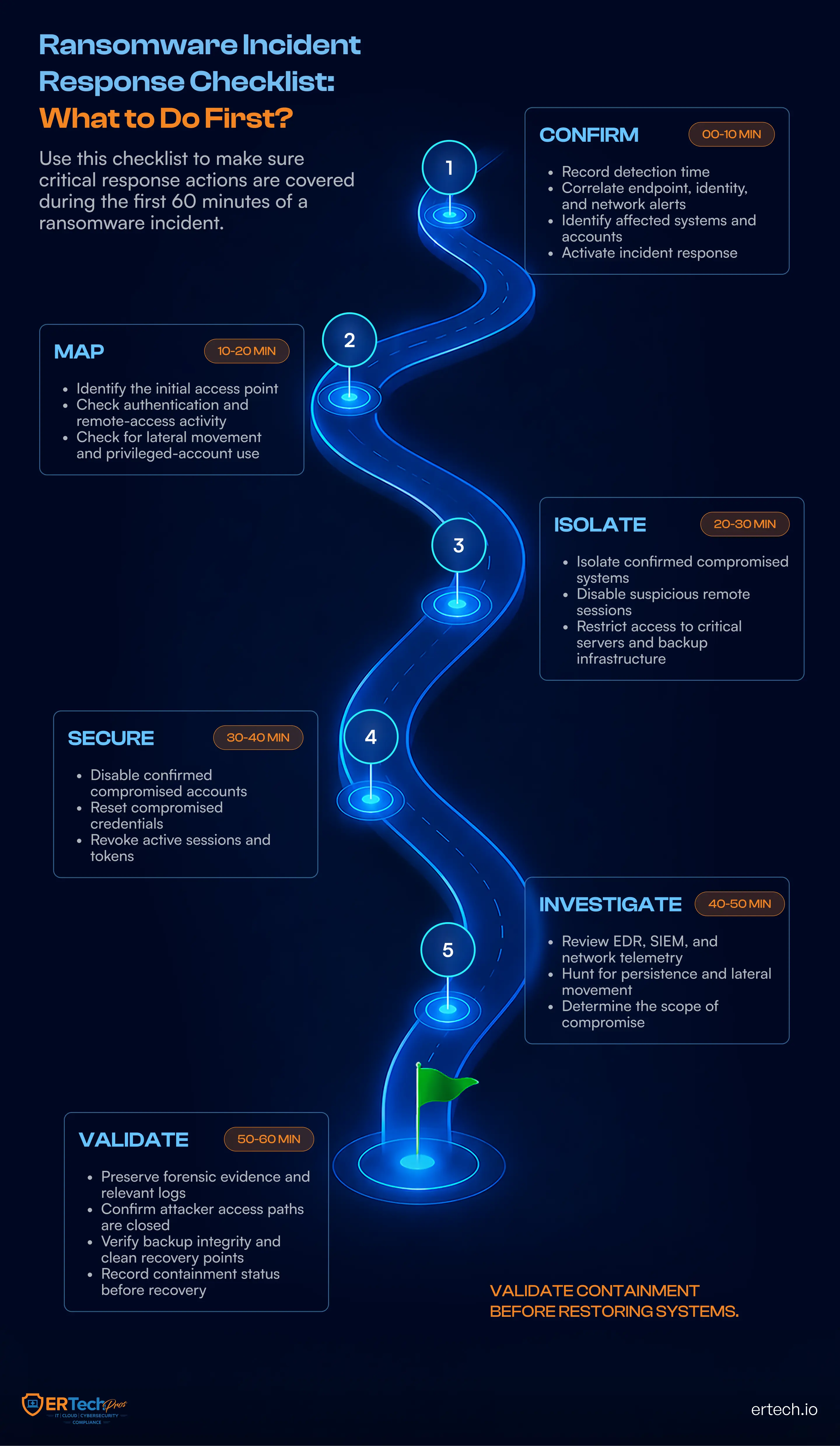
0-10 Minutes: Validate the Ransomware Indicators
The first alert may not look like ransomware. The first alert may not look like ransomware. Understanding how ransomware works helps explain why early indicators can appear before encryption begins.
A user may report a suspicious phishing email or inaccessible files. An EDR platform may flag suspicious PowerShell activity or malware execution. A privileged account may authenticate from an unusual endpoint. A server may begin making unexpected connections to other systems.
Individually, these events may not confirm an attack. Together, they can reveal an active compromise.
Step 1: Correlate the Signals
The first stage of cybersecurity incident response is correlation. Security teams should bring together endpoint telemetry, authentication records, remote-access activity, firewall logs, DNS activity, and file-system behavior.
The objective is to determine whether the environment is experiencing an isolated technical problem or a coordinated intrusion.
Step 2: Confirm the Threat
Look for multiple indicators pointing to the same attack path. Suspicious scripting combined with abnormal authentication, lateral movement, unusual file activity, or security-tool tampering should raise the response priority.
Do not wait for files to be encrypted or a ransom note to appear before treating a credible compromise as an incident.
Step 3: Activate the Response
When the available evidence indicates ransomware activity, activate the ransomware response plan immediately. The team should establish a formal incident timestamp, assign an incident lead, and begin documenting the evidence that triggered escalation.
At this point, the objective is no longer simply to determine whether something is wrong. It is to establish what the attacker can currently reach, and stop that access from expanding.
10-20 Minutes: Identify What the Attacker Can Reach
Once ransomware activity is considered credible, the next question is not simply which device is infected. It is how far the attacker can currently reach.
An infected workstation may be only one point of entry. Understanding how ransomware works helps responders trace how an attacker could move from initial access to additional systems. If compromised credentials, remote-access sessions, or elevated privileges are involved, the attacker may already have a path to file servers, applications, backup infrastructure, or other endpoints.
Step 1: Map the Attack Path
Start with the affected endpoint, user account, or server and trace its recent activity.
Review authentication events, remote sessions, privileged account activity, network connections, and communication with other systems. Look for evidence of lateral movement, privilege escalation, or attempts to establish persistence.
The goal is to identify the systems, accounts, and connections that could allow the attacker to move further into the environment.
Step 2: Identify Critical Assets
Determine which systems connect to the affected environment and which could materially increase the incident's impact.
Prioritize domain controllers, critical servers, databases, backup infrastructure, cloud resources, and systems containing sensitive business data. This assessment helps the response team determine where to tighten access controls first.
Step 3: Determine the Attacker’s Current Access
The objective is to establish the attacker’s current level of access, not just where the suspicious activity was first detected.
Ask three questions:
- Which accounts may be compromised?
- Which systems can those accounts reach?
- What additional systems could the attacker access from those systems?
This creates a working attack map and gives responders the information they need for the next stage: isolating affected systems without unnecessarily disrupting the rest of the business.
20-30 Minutes: Isolate the Threat Without Losing Control
Knowing where an attacker has been is only half the problem. The next challenge is stopping where they can go.
At this stage of ransomware attack response, containment should be deliberate. Disconnecting every system from the network may appear safe, but an uncontrolled shutdown can destroy valuable forensic evidence, interrupt critical operations, and make it harder to understand the attacker’s path.
The objective is to break the attack path while maintaining visibility and control.
Isolate the Systems Showing Risk
Begin with systems showing confirmed malicious activity or clear indicators of compromise. Depending on the environment, that may include an infected workstation, compromised server, active remote-access session, or endpoint communicating with known malicious infrastructure.
Network isolation can prevent further lateral movement while allowing security teams to continue investigating the affected environment. Where possible, isolate systems through endpoint and network controls rather than simply powering them off.
Protect What the Attacker Wants Next
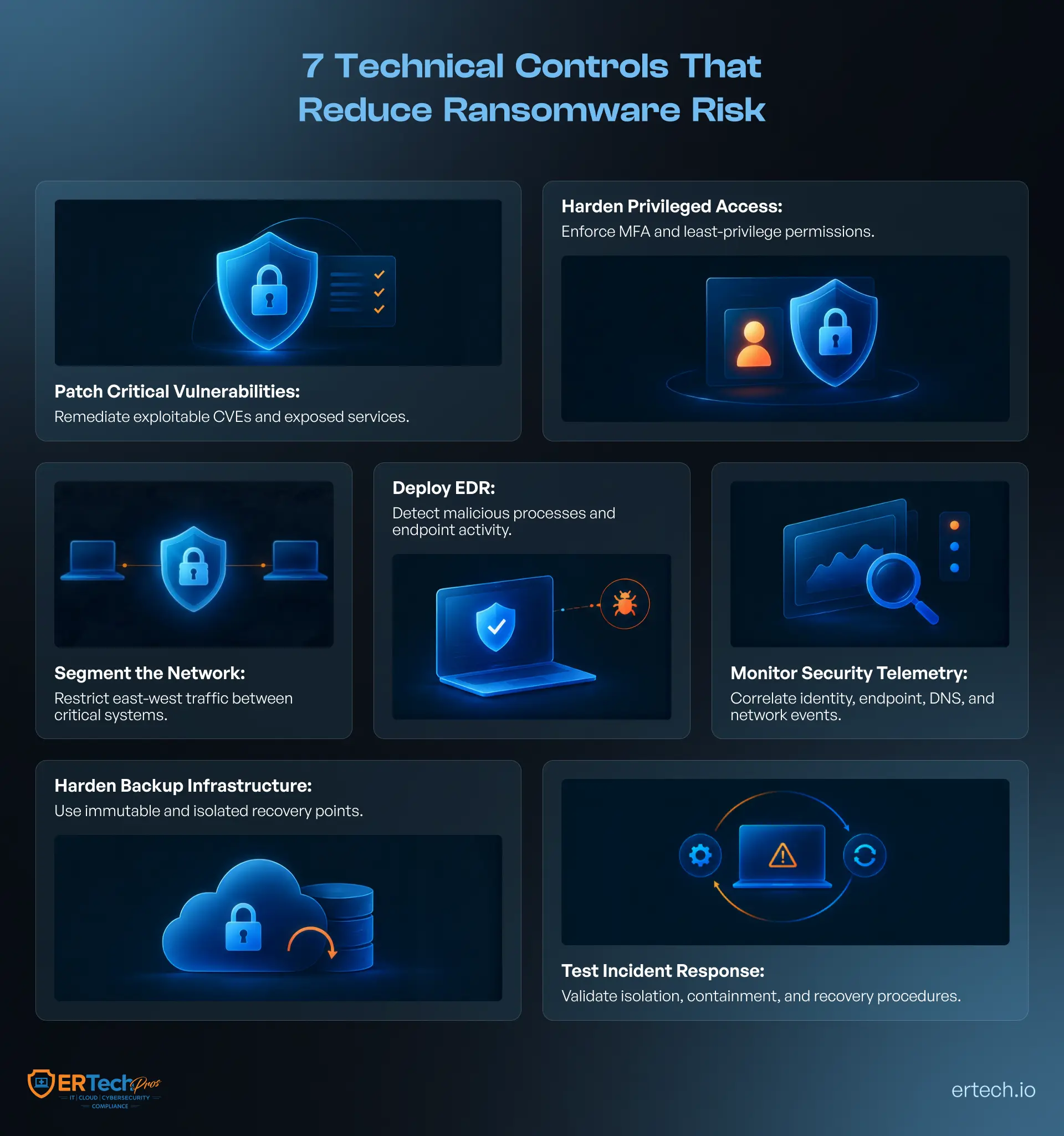
Ransomware operators do not necessarily stop after compromising an endpoint. They may target administrative systems, shared storage, virtualization infrastructure, and backup environments to make recovery more difficult. Ransomware-resistant backups should remain isolated from production credentials and protected against unauthorized modification or deletion.
That makes network security and segmentation particularly important during containment. Restrict unnecessary communication between affected systems and critical infrastructure, and monitor for attempts to establish new connections.
The response team should also watch for changes in attacker behavior. A sudden increase in authentication attempts, new remote sessions, or attempts to disable security controls can indicate that the attacker is adapting to containment.
Containment is successful when the attacker’s ability to move, escalate, and access additional systems is shrinking, not simply when one infected machine has been disconnected.
30-50 Minutes: Take Back Control of Identities and Access
By the 30-minute mark, isolating affected systems may have slowed the attack, but it does not necessarily prevent the attacker from returning.
If stolen credentials were used to enter the environment, disconnecting one endpoint will not be enough. An attacker with valid credentials may simply authenticate through another device, remote-access service, or privileged account.
This is where identity becomes a central part of cybersecurity incident response.
Lock Down Compromised Accounts
Review accounts associated with the initial compromise and any suspicious authentication activity identified during the investigation.
Disable or reset compromised credentials, terminate active sessions, revoke suspicious tokens, and restrict privileged accounts where necessary. Pay particular attention to domain administrators, remote-access accounts, service accounts, and other identities with broad permissions.
The goal is to remove the attacker’s ability to reuse stolen credentials while avoiding unnecessary disruption to legitimate users and critical operations.
30-40 Minutes: Close the Access Paths
Credential compromise is rarely isolated to a single account. Look for unusual privilege assignments, newly created accounts, abnormal authentication locations, repeated failed logins, and unexpected remote-access activity.
Security teams should also review whether the attacker attempted to disable security controls or obtain additional credentials.
Strong identity policies, segmentation, and least-privilege controls can significantly reduce the attacker’s options.
40-50 Minutes: Determine How Far the Attack Has Spread
With immediate access paths being restricted, shift attention to the broader environment.
Use endpoint detection and response (EDR) telemetry, SIEM data, authentication logs, firewall records, and network activity to identify systems that may have been accessed or influenced by the attacker. Look for lateral movement, privilege escalation, persistence mechanisms, unusual file activity, and attempts to reach backup infrastructure.
Do not assume that the first compromised device is the only compromised device.
At this stage, the response team should be building a defensible picture of the incident: what was accessed, which accounts were affected, which systems may be compromised, and whether the attacker still has a viable path into the environment.
The next 10 minutes should then focus on preserving that evidence and determining whether the environment is safe enough to move toward recovery.
50-60 Minutes: Preserve Evidence and Validate Containment
By the final 10 minutes of the first hour, the response team should have moved from initial triage to evidence preservation and containment validation.
Stopping visible encryption activity does not prove that the attacker has been removed. A compromised account, scheduled task, remote-access session, persistence mechanism, or active command-and-control channel can allow an intrusion to continue even after an endpoint has been isolated.
Preserve the Forensic Trail
Collect and preserve telemetry before rebuilding, reimaging, or otherwise modifying affected systems.
Security teams should retain relevant EDR telemetry, Windows Event Logs, authentication and Kerberos events, PowerShell logs, VPN and remote-access records, firewall and DNS logs, process execution data, network-flow records, and cloud audit logs.
Where available, capture indicators such as malicious file hashes, suspicious IP addresses and domains, command-line arguments, parent-child process relationships, unusual services, scheduled tasks, registry modifications, and evidence of credential access.
This evidence can help investigators reconstruct the intrusion, identify the initial access vector, determine lateral movement, and establish whether sensitive systems or data were accessed.
Hunt for Persistence and Lateral Movement
Test containment rather than assume it.
Use endpoint and identity telemetry to look for newly created accounts, abnormal privileged activity, remote service execution, PowerShell or scripting activity, unexpected administrative shares, credential reuse, scheduled tasks, startup persistence, and connections between systems that do not normally communicate.
Pay particular attention to domain controllers, identity infrastructure, virtualization platforms, file servers, and backup systems. If these systems remain accessible to the attacker, restoring an individual endpoint will not resolve the underlying compromise.
Validate the Recovery Path
Only after you validate containment should recovery planning move forward.
Identify clean recovery points and verify that backup infrastructure has not been compromised or altered. If your organization has experienced a breach, do not begin recovery until you have assessed affected systems, credentials, persistence mechanisms, and recovery infrastructure.
The first hour is not about declaring the incident over. It is about reaching a position where the organization can make its next decision based on verified telemetry, controlled access, preserved evidence, and a defensible understanding of the attack.
That is what turns a reactive ransomware response into disciplined cybersecurity incident response
Where Ransomware Response Commonly Fails
The first 60 minutes can be lost through gaps in visibility, identity controls, or recovery readiness.
Responding Only After Encryption
By the time files are encrypted, an attacker may have already escalated privileges, moved laterally, or accessed sensitive data. Effective ransomware protection strategies focus on detecting those behaviors before encryption begins.
Isolating the Wrong Scope
Taking one endpoint offline does not contain an attacker with valid credentials or active sessions elsewhere. Response teams must correlate endpoint, identity, and network telemetry to identify lateral movement and remaining access paths.
Resetting Passwords Without Revoking Access
A password reset alone may not terminate active sessions, tokens, service-account access, or other persistence mechanisms. Identity containment must address the attacker’s complete authentication path.
Restoring Before Containment Is Verified
Recovery should follow investigation. Validate backup integrity, privileged accounts, persistence mechanisms, and affected infrastructure before returning systems to production.
Relying on an Untested Plan
A response procedure is only effective if teams can execute it under pressure. Tabletop exercises, attack simulations, endpoint isolation tests, and recovery drills reveal operational gaps before a real incident exposes them.
The technical lesson is straightforward: effective ransomware incident response depends on visibility, controlled access, rapid containment, and verified recovery.
With ER Tech Pros, You Don't Wait 60 Minutes
A ransomware checklist tells your team what to do after detecting suspicious activity. ER Tech Pros works to identify and disrupt that activity before it becomes a business-impacting ransomware incident.
ER Tech Pros takes a proactive approach to cybersecurity services, combining continuous visibility, preventive controls, and rapid threat disruption to reduce the opportunity for attackers to gain a foothold and move deeper into your environment.
Instead of waiting for a ransom note to trigger an investigation, our security approach looks for the signals that can precede one and attempts to disable security controls.
What We Do to Prevent Your Business From Facing an Attack
- Monitor 24/7: Continuously analyze security events across endpoints, servers, identities, cloud environments, and network infrastructure.
- Detect Threats Early: Use AI-driven behavioral analysis and security telemetry to spot abnormal activity before it becomes a larger incident.
- Contain Compromised Endpoints: Use EDR capabilities to investigate malicious processes and isolate affected devices when necessary.
- Secure Identities: Monitor privileged accounts, authentication patterns, remote-access sessions, and potential credential misuse.
- Eliminate Vulnerabilities: Identify and prioritize exploitable weaknesses before attackers can use them for initial access.
- Restrict Lateral Movement: Apply segmentation and access controls to limit how an attacker can move between systems.
- Protect Recovery Infrastructure: Maintain secure backup and recovery capabilities so ransomware cannot easily eliminate your path to recovery.
- Respond Immediately: Use established detection and containment procedures to investigate credible threats and disrupt them before they spread.
The objective is not to wait for the first 60 minutes and then ask how quickly the business can recover.
Don't Wait for the First 60 Minutes
A ransomware response checklist gives your team a structured way to act when an attack is detected. But the stronger strategy is to detect suspicious activity before it becomes ransomware, contain threats before they spread, and continuously reduce the opportunities attackers can exploit.
With ER Tech Pros, your security does not begin when an incident starts. It starts long before one.
Don’t Wait for Ransomware to Test Your Response Plan!
Schedule a FREE Security Assessment with ER Tech Pros and identify where your business could be exposed.
Got Questions?
We've Got Answers
Find clear answers to common questions that help guide your IT operations.
Related Content
How to Build a Cybersecurity Incident Response Plan for Your Business

IT Disaster Recovery Plan for Small Businesses: A Complete Guide