The Anatomy of a Phishing Email: How to Spot, Stop, and Report Them
Phishing emails are getting harder to spot, and one wrong click can cost your business everything. Learn how to protect your organization from email phishing scams before it's too late.
Cybercriminals don't always break through firewalls or crack complex passwords. Most of the time, they simply send an email and wait for someone to click.
Phishing emails are one of the most effective and widely used cyber threats targeting businesses of every size and industry. One convincing message, one rushed moment, and attackers can gain access to your systems, sensitive data, and employee credentials before anyone even notices that something is wrong.
According to the World Economic Forum's Global Cybersecurity Outlook, human error accounts for 95% of all cybersecurity incidents, and phishing attacks sit at the center of that statistic. These aren't clumsy, obvious scams anymore. They're polished, targeted, and designed to catch even experienced professionals off guard.
At ER Tech Pros, we help organizations build smarter defenses against these threats every day. And one of the most powerful tools we give people isn't a piece of software. It's simply knowing what to look for.
This blog walks you through everything you need to know: how to recognize phishing emails, what information is at risk, what to do if you suspect or fall for one, and how to create an environment where your whole team stays alert.
What Is Phishing?
Phishing is a type of cyberattack where criminals impersonate trusted individuals or organizations to trick people into revealing sensitive information or taking actions that compromise security. It's one of the most common forms of social engineering used today.
What Is a Phishing Email?
A phishing email is a fraudulent message crafted to appear to be from a legitimate source, such as your bank, a software vendor, a colleague, or even your own IT department. The goal is always the same: get you to click a malicious link, download an infected attachment, or hand over login credentials and sensitive information.
What makes email phishing so dangerous is how convincing it looks. These messages often copy real branding, use professional language, and mimic the exact formatting of communications you'd normally trust. They're not meant to look fake. They're meant to look completely normal, and that's exactly the problem!
How to Recognize a Phishing Email
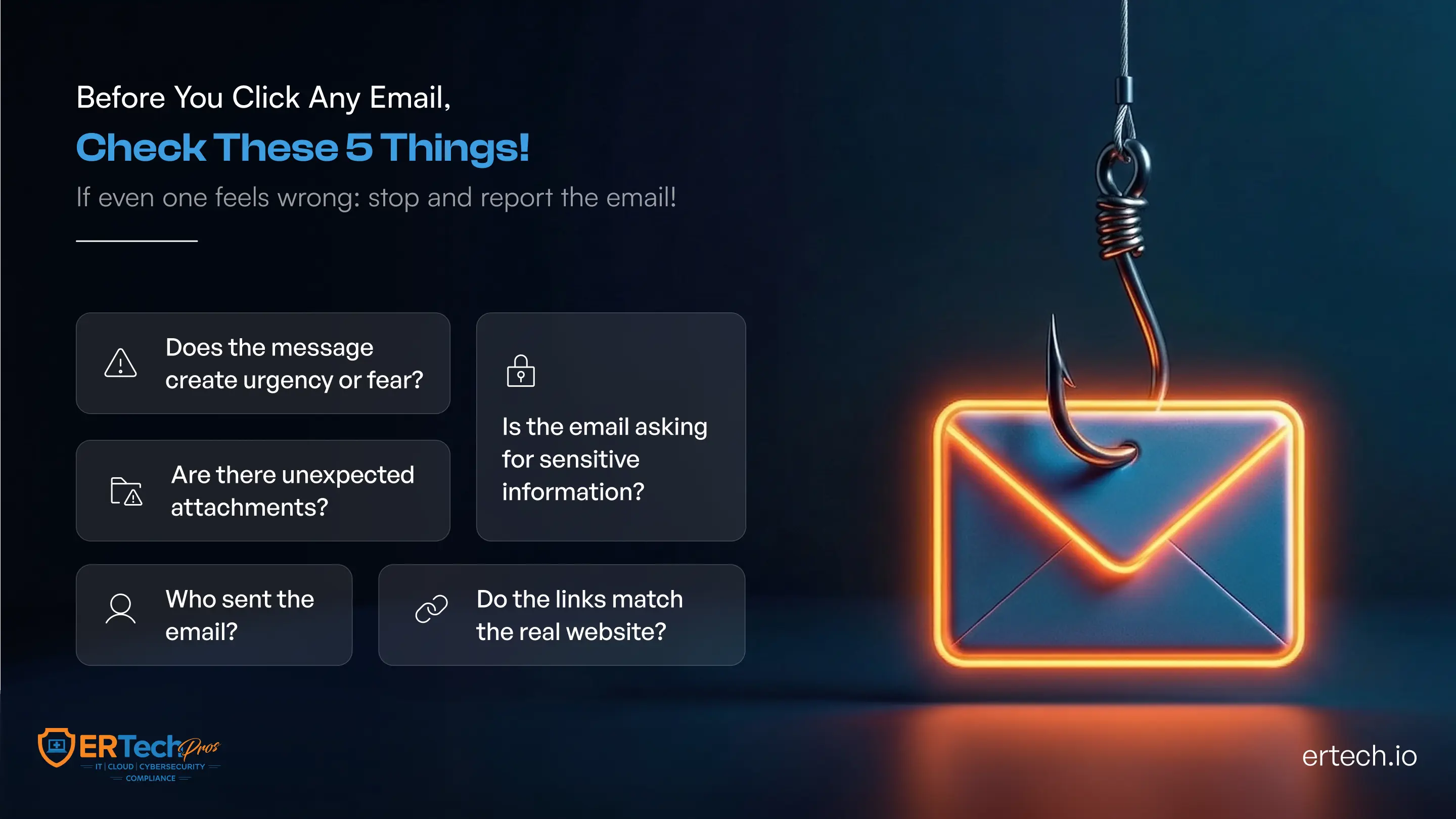
Learning to spot a phishing email doesn't require a technical background. It just requires knowing the patterns. Here's what to watch for:
Urgency and Pressure Tactics
If an email is pushing you to act immediately, that's a red flag. Phrases like "Your account will be suspended in 24 hours" or "Immediate action required" are designed to make you panic and click before you think. Legitimate businesses don't typically demand instant responses through email alone.
Suspicious Sender Address
The display name might say "IT Support," but the actual email address tells a different story. Look closely for subtle misspellings, such as support@it1.com, or messages from completely unrelated domains. This is one of the clearest signs of a phishing email and one of the easiest to miss if you're moving quickly.
Generic Greetings
Real organizations that have your information will use your name. If an email opens with "Dear Customer," "Hello User," or "Dear Account Holder," it's a strong indicator that the message was blasted to thousands of people at once: a hallmark of email phishing scams.
Mismatched or Suspicious Links
Before clicking any link, hover over it to see where it actually leads. If the visible text says "Verify Your Account" but the underlying URL looks unfamiliar or oddly formatted, don't click it. Email phishing attacks almost always rely on disguised links to do their damage.
Unexpected Attachments
An email you weren't expecting that includes an attachment, especially a .zip, .exe, or even a seemingly harmless Word or PDF file, should immediately raise concern. These files frequently contain malware that activates the moment you open them.
Spelling and Grammar Issues
Many phishing scams, particularly those run by larger criminal operations, contain awkward phrasing, inconsistent formatting, or outright grammar errors. Not every phishing email will have these, but when you see them, take note.
Requests for Sensitive Information
No legitimate organization will ask you to confirm your password, Social Security number, or payment details over email. If an email asks for this kind of information, treat it as a phishing attack until proven otherwise.
Which Type of Data and Information Is at Risk from Phishing Attacks?
Phishing attacks don't go after just one type of information. Depending on who's behind the attack and what they're after, a wide range of data can be exposed through a single successful phishing email.
Login Credentials
Usernames and passwords are the top targets for most phishing scams. Once attackers have these, they can log in as legitimate users, access your systems, and move through your network completely undetected.
Financial and Banking Details
Credit card numbers, bank account information, and payment credentials are highly sought after. These are either used directly for fraud or sold to other criminals almost immediately after being stolen.
Personal Identifiable Information (PII)
Names, addresses, dates of birth, and Social Security numbers give attackers everything they need to commit identity theft: damage that can follow someone for years after the initial breach.
Business and Corporate Data
For organizations, email phishing attacks can expose internal communications, client records, trade secrets, and proprietary data. This kind of breach doesn't just hurt the business financially; it damages trust with clients and partners in ways that can take years to rebuild!
Access Tokens and System Credentials
Beyond simple passwords, attackers also target the tokens and credentials that grant access to cloud platforms, internal tools, and administrative systems. Without proper monitoring, organizations may not even realize these have been compromised until significant damage is already done.
How to Protect Your Organization from Phishing Email Attacks
Staying protected from email phishing comes down to combining smart personal habits with the right technical tools. Neither alone is enough.
Pause Before You Click
This sounds simple, but it's genuinely the most effective habit you can build. Before clicking any link or opening any attachment, take a moment to ask yourself: Was I expecting this? Does this make sense? Could this be a phishing scam? A few seconds of hesitation can prevent enormous damage.
Verify Through a Separate Channel
If you receive an unexpected email from your bank, a vendor, or a colleague asking you to take action, reach out to them directly using a phone number or contact you already have, not anything provided in the email itself.
Enable Multi-Factor Authentication (MFA)
Even if attackers steal your password through an email phishing attack, MFA adds a second layer of verification that stops them from actually getting in. This is one of the single most effective defenses available for both individuals and organizations.
Keep Software and Systems Updated
Outdated systems have known vulnerabilities that phishing attacks can exploit once malware is delivered. Consistent patching and updates close those gaps before attackers can use them.
Use Email Filtering and Anti-Phishing Tools
Modern email security tools can detect and quarantine suspected phishing emails before they even reach your inbox. ER Tech Pros implements and manages these solutions for organizations as part of a broader layered cybersecurity approach.
Never Reuse Passwords
If one account is compromised through an email phishing scam, reused passwords give attackers a free pass into every other account tied to the same credentials. Use a password manager to keep unique, strong passwords across all accounts.
Impact of Phishing Emails in Remote Working Environments
The rise of remote and hybrid work has created a much larger playing field for phishing scams. Employees working outside a traditional office environment face a distinct set of risks that deserve specific attention.
When people work from home, they're often on personal devices, connected to home networks, and operating without the security infrastructure of a corporate environment. That combination is exactly what makes email phishing attacks so effective in remote settings.
Remote workers are also more likely to act quickly on urgent-sounding emails without being able to turn to a nearby colleague or walk to the IT desk to verify. The informal, in-person checks that naturally happen in an office don't exist at home, and phishing emails are designed to exploit exactly that kind of isolation.
Home networks also typically lack the segmentation, monitoring, and filtering that protect office environments. A single successful phishing email attack on a remote employee can open a door straight into your organization's core systems.
Businesses with distributed teams, remote customer service staff, or employees accessing cloud systems from home need to make sure their cybersecurity protections extend beyond the office walls. ER Tech Pros helps organizations build consistent, scalable security coverage across all locations and devices.
Analysis of a Phishing Email: 5 Clues to Spot Scams
Let's walk through a real-world phishing email scenario and break down exactly what gives it away.
Scenario: You receive an email with the subject line: "ACTION REQUIRED: Verify Your Account Immediately."
Clue 1 – The Sender Address Doesn't Add Up
The display name reads "IT Support," but the actual sending address is something like support@it-account-verify.net. Legitimate IT Support emails only come from @companyname.com domains. That mismatch alone is enough to flag this as an email phishing scam.
Clue 2 – The Language Is Designed to Panic You
The body of the email reads: "Your account access will be permanently disabled in 12 hours unless you verify your information now." That artificial urgency is a classic phishing attack tactic, built to override your instinct to stop and think.
Clue 3 – The Link Goes Somewhere It Shouldn't
The email includes a button that says "Verify My Account." When you hover over it, the actual URL reads something like http://it-login.verify-secure.biz/account. That domain has nothing to do with your company’s IT support, and clicking it could install malware or send your credentials straight to an attacker.
Clue 4 – It Doesn't Know Who You Are
The email opens with "Dear User" rather than your actual name. Real service providers address you personally because they have your account information.
Clue 5 – There's No Personalized Context
The message doesn't mention your organization, your account details, or anything specific to you. It's a mass message built to look urgent enough that someone, somewhere, will click without thinking.
Spotting even one of these clues should be enough to make you stop. Spotting several confirms you're looking at a phishing email, and now you know not to touch it.
What to Do If You Suspect a Phishing Email Attack
If something feels off about an email, trust that feeling. Here's exactly what to do:
Don't click anything or open any attachments - Treat the email as untouchable until someone with authority tells you otherwise.
Don't reply to the email - Responding lets attackers know your address is active and can invite further targeting.
Report it to your IT or security team right away - The faster a suspected phishing email gets flagged, the sooner protective steps can be taken for the whole organization.
Mark it as phishing or spam in your email - This helps train your email filters to catch similar messages going forward.
Verify directly with the supposed sender - If the email appears to be from a vendor or service provider you use, contact them through their official website or a phone number you already have on file, not anything included in the suspicious email.
What to Do If You Responded to a Phishing Email
If you've already clicked a link, opened an attachment, or submitted information before realizing it was a phishing scam, the most important thing is to act immediately when experienced a breach. Speed is everything here.
Change your passwords right away - Start with the account that was targeted, then move to any other accounts where you've used the same or similar credentials.
Turn on MFA if it isn't already active - Even if attackers now have your password, multi-factor authentication adds a barrier that keeps them from getting in.
Tell your IT or security team immediately - They need to know so they can assess how far the compromise goes, check for unauthorized access, and contain the damage before it spreads.
Run a malware scan on your device - If you opened an attachment from a phishing email, your device may be infected. Use your organization's approved endpoint protection tools to run a full scan right away.
Keep a close eye on your accounts - Watch for unusual activity in your email, financial accounts, and any platforms you regularly use. Report anything that looks out of place without delay.
It's worth saying clearly: falling for a phishing email doesn't mean someone was careless or foolish. These scams are deliberately engineered to deceive. What matters most is how quickly and decisively you respond when it happens.
Increase Employee Awareness About Phishing Emails
Here's the honest truth: technology can only do so much. People are the last line of defense against phishing attacks, and they need to be genuinely prepared, not just technically covered.
Run Simulated Phishing Exercises - Sending controlled, consequence-free phishing emails to your own employees is one of the most effective ways to build real recognition skills. When someone clicks on a simulated phishing link, they receive immediate training in the moment rather than facing real-world consequences. ER Tech Pros helps organizations set up and run these exercises as part of a structured security awareness program.
Make Training Ongoing, Not Just an Annual Thing - A once-a-year cybersecurity course is better than nothing, but it's not enough. Phishing scams evolve constantly, and your training needs to keep pace. Short, regular sessions tied to current threats stick far better than long, infrequent ones.
Build Clear, Easy Reporting Channels - Employees need to know exactly where to go when they suspect a phishing email, and they need to feel comfortable reporting without fear of blame. A simple, well-communicated reporting process dramatically increases the chances of catching threats early.
Share Real Examples with Your Team - When phishing attempts targeting your industry are identified, share sanitized examples with your staff. Real-world context makes the risk feel tangible and significantly more effective training.
Get Leadership Involved - When executives and managers visibly participate in awareness training and treat phishing attack prevention as a genuine priority, it sends a signal to the entire organization. Culture flows from the top, and security culture is no different.
Build A Stronger Defense Against Phishing Emails
Phishing emails aren't going away. If anything, they're getting smarter, more targeted, and harder to tell apart from legitimate communication. And with 95% of cybersecurity incidents tied back to human error, the way your team responds to a suspicious email matters enormously.
The good news is that awareness is a genuine competitive advantage. When people know the signs of phishing emails to look for, how to respond, and how to report them, your entire organization becomes significantly harder to compromise. Layer that awareness on top of the right technology and expert support, and you've built a defense that's genuinely difficult to break through.
At ER Tech Pros, we help businesses build exactly that kind of protection: people-first, technology-backed, and adaptable as threats evolve. Whether you're looking to assess your current vulnerabilities, run employee awareness training, or implement smarter email security tools, we're ready to help!
Got Questions?
We've Got Answers
Find clear answers to common questions that help guide your IT operations.
Related Content
Ransomware Incident Response Checklist: What to Do in the First 60 Minutes
How to Build an Effective Ransomware Response Plan