How Much Do Managed IT Services Cost in 2027? A Complete Guide for Businesses
Planning your IT budget for 2027? Understand managed IT services costs, compare provider pricing models, and determine which service arrangement makes financial sense for your business.
A business planning its IT budget for 2027 has more to consider than the cost of keeping computers and networks operational. Cybersecurity, cloud infrastructure, data protection, employee support, and system availability all influence how much an organization needs to invest in technology management.
The financial impact of overlooking these requirements can be substantial. According to IBM's Report, the global average cost of a data breach reached $4.99 million. While this figure does not represent the typical loss for every business, it highlights the financial exposure organizations may face when security and incident management fall short.
For many businesses, partnering with a managed service provider (MSP) offers a way to access technical expertise, ongoing IT support, and cybersecurity capabilities without building an entire internal department. However, managed IT service costs can vary considerably depending on the number of users, infrastructure complexity, service coverage, and the level of protection required.
So, how much should a business actually budget for managed IT services in 2027?
This guide explores the factors that influence monthly costs and helps businesses evaluate whether an MSP is the right investment for their IT requirements.
Need Help Planning Your IT Budget for 2027?
What Determines the Cost of Managed IT Services?
Two businesses with the same number of employees can receive very different MSP quotations. Employee count represents only one part of the IT environment.
A business using cloud-based applications and standardized endpoints may require less hands-on infrastructure management than an organization operating multiple offices, physical servers, complex network environments, and specialized applications.
Several factors influence the final managed service provider pricing.
Number of Users and Managed Devices
The number of employees determines how many people need help desk support, account management, and access to business applications.
However, providers also consider the number and type of devices they manage. A single employee might use a laptop, desktop, smartphone, and tablet, while another may share a workstation with several colleagues.
This distinction matters when comparing per-user and per-device contracts.
Infrastructure and Network Complexity
The technology environment directly affects the work required to maintain it.
A business with a straightforward cloud environment may need relatively little infrastructure intervention. Organizations operating physical servers, virtual machines, complex network configurations, and multiple locations require more monitoring and maintenance.
The provider may also need to manage firewalls, switches, wireless access points, remote access systems, and integrations between business applications.
These requirements influence both the tools and technical expertise needed to deliver the service.
Cybersecurity and Compliance Requirements
Basic IT support and advanced cybersecurity are not interchangeable services.
Businesses with higher security requirements may need endpoint detection and response (EDR), security information and event management (SIEM), vulnerability assessments, security operations center (SOC) monitoring, and incident response capabilities.
Regulatory requirements can introduce additional responsibilities, including access reviews, security documentation, audit support, and policy management.
Comparing the security capabilities offered by the top managed IT service providers can help businesses understand whether a quoted price reflects the level of protection and compliance support their IT environment requires.
Support Availability and Response Expectations
For organizations operating across time zones or relying on critical systems outside standard working hours, extended support coverage may be necessary.
It is also important to distinguish between 24/7 infrastructure monitoring and 24/7 technical support. Automated monitoring may operate continuously, while live engineer assistance could be limited to specified service hours.
Service-level agreements (SLAs) should explain response times, escalation procedures, service availability, and the provider's responsibilities during major disruptions.
Number of Locations and On-Site Requirements
A company operating from one office may have relatively straightforward support requirements.
A business with several branches may need additional network management, endpoint oversight, coordination between locations, and on-site technical assistance.
These are some of the key factors that affect IT support costs and should be evaluated before comparing provider quotations.
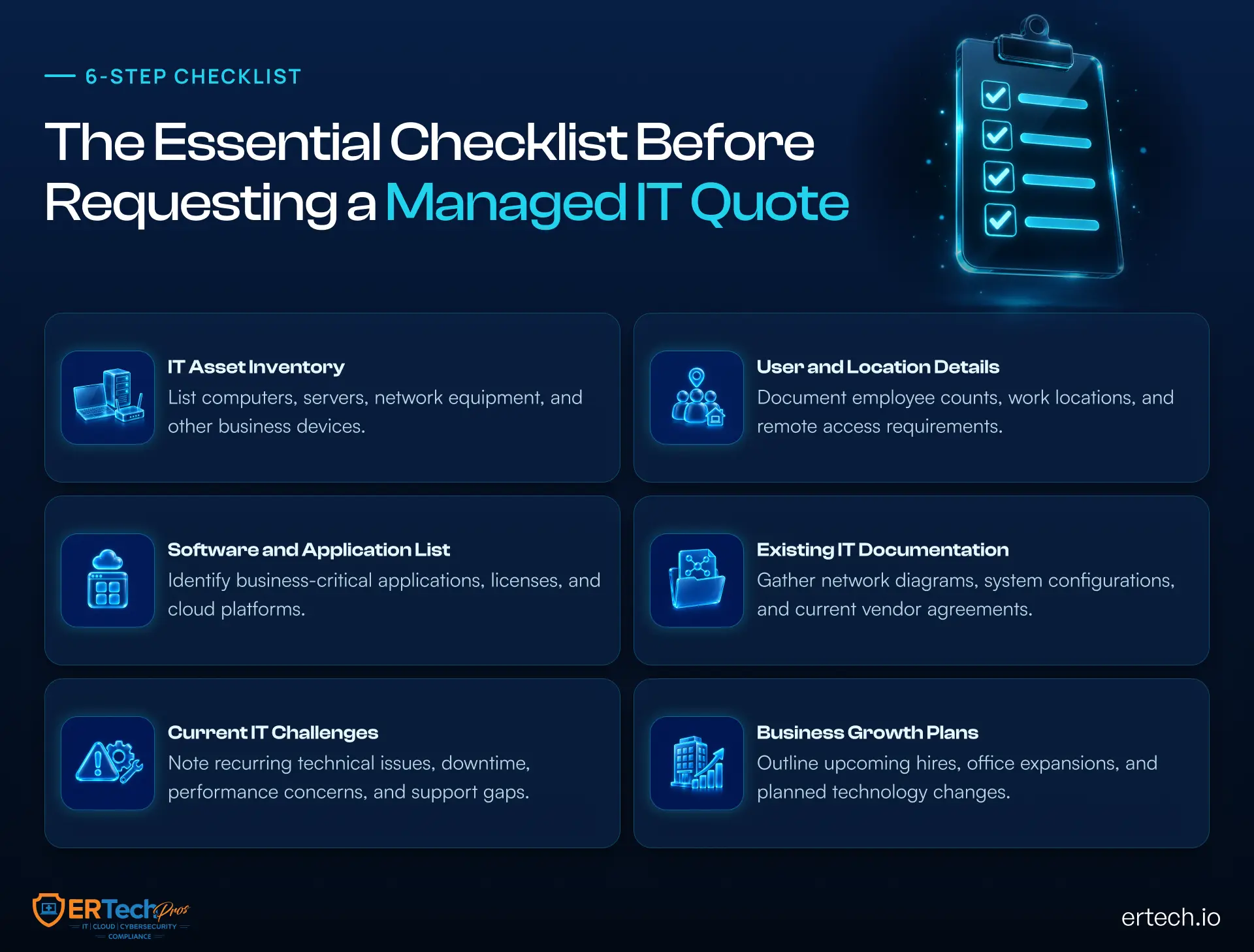
Which MSP Pricing Model Is Right for Your Business?
For organizations exploring managed IT services for small businesses, the right pricing structure depends on their workforce, technology requirements, available internal resources, and expected level of support.
Understanding these pricing structures is an important part of how to choose the right MSP.
Per-User Pricing
Under this model, the provider charges a fixed monthly amount for each supported employee.
For example, if an MSP charges $150 per user per month, a business with 25 employees would pay $3,750 per month.
This approach is particularly useful for organizations where employees use multiple devices and need consistent access to IT support.
As the workforce grows or shrinks, the monthly fee can be adjusted based on the number of supported users. However, businesses should confirm which devices, applications, and support responsibilities each user license includes.
Per-Device Pricing
Per-device pricing calculates the monthly fee according to the number of endpoints and infrastructure components under management.
The provider may charge separate rates for desktops, laptops, servers, firewalls, and network equipment.
For example, a company with 30 workstations, two servers, and several network devices may receive an itemized monthly quotation based on its complete device inventory.
This approach works well for businesses with shared workstations, manufacturing equipment, or environments where the number of devices does not directly correspond to employee count.
The main consideration is that adding devices can increase the monthly bill even when the workforce stays the same.
Tiered Pricing
Some providers organize their services into predefined packages, such as basic, standard, and premium.
Each tier offers a different combination of support, maintenance, monitoring, and security capabilities.
A basic package might include routine maintenance and remote support. A higher tier could add advanced endpoint protection, backup management, vulnerability monitoring, and extended service coverage.
Tiered arrangements make service levels easier to compare. However, businesses should carefully examine the boundaries between packages.
A provider may advertise cybersecurity as part of its premium offering while charging separately for incident response, security assessments, or specialized compliance work.
Flat-Fee or All-Inclusive Pricing
Under a flat-fee arrangement, the provider charges one agreed monthly amount for a defined scope of IT services.
This can make financial planning easier because businesses know what to expect each month, regardless of routine support activity.
However, don't take the term "all-inclusive" literally without reviewing the agreement.
Hardware purchases, software licensing, major infrastructure projects, new office deployments, and specialized consulting may remain outside the monthly fee.
A clearly documented scope of work is essential to avoid unexpected charges.
Break-Fix and Hourly IT Support
Not every business requires a fully managed IT agreement.
Some organizations choose to pay for technical assistance only when an issue occurs. This is commonly known as break-fix support.
The provider charges an hourly rate or a fixed fee for individual tasks rather than collecting a recurring monthly payment.
Although this model may seem less expensive at first, it does not necessarily include continuous monitoring, preventive maintenance, or ongoing cybersecurity oversight.
Businesses with limited IT requirements may find it suitable, but organizations that depend heavily on technology should consider the operational consequences of waiting until a problem occurs.
For a deeper comparison of pricing models and ROI, businesses should evaluate not only the billing structure but also the responsibilities covered by each arrangement.
What Is Included in Managed IT Services Pricing?
When evaluating service agreements, businesses should also understand the difference between managed vs. co-managed IT. Fully managed services transfer agreed IT responsibilities to an external provider, while co-managed arrangements allow internal IT teams to retain control of certain functions and receive additional support from an MSP.
Common managed IT services include:
IT Help Desk and Technical Support
Employees receive assistance with software issues, account access, device configuration, email, connectivity, and routine troubleshooting. Support hours, escalation procedures, and on-site assistance should be clearly defined in the agreement.
Remote Monitoring and Infrastructure Management
Remote monitoring and management (RMM) tools help providers oversee servers, workstations, networks, and other IT assets. Services may include system monitoring, patch management, software updates, routine maintenance, and performance management.
Cybersecurity and Endpoint Protection
Depending on the package, managed IT services pricing may include antivirus protection, endpoint detection and response (EDR), firewall management, vulnerability monitoring, SIEM, and security operations center (SOC) monitoring. Businesses should confirm which security controls the provider actively manages.
Backup and Disaster Recovery
Services may cover scheduled backups, off-site storage, backup monitoring, restoration testing, and disaster recovery planning. The agreement should specify protected systems, backup frequency, retention periods, and recovery responsibilities.
Cloud and Infrastructure Management
Managed cloud services can include cloud configuration, access administration, resource management, performance monitoring, and maintenance of virtual servers and hybrid environments.
Strategic IT Planning and Vendor Management
Some providers offer virtual CIO (vCIO) services to help businesses plan technology investments, manage infrastructure upgrades, review IT budgets, and coordinate with technology vendors.
Understanding what managed IT services include helps businesses compare provider agreements and identify differences in service scope, technical responsibilities, and ongoing support.
How to Calculate the ROI of Managed IT Services
Monthly pricing is only one part of the financial decision.
Also evaluate a managed IT agreement by the operational value it delivers, the internal costs it can reduce, and the risks it helps businesses manage. A lower monthly quote does not necessarily mean better financial value if the agreement excludes essential services or leaves the business responsible for major technical and security gaps.
Compare the Total Cost of IT Ownership
Start by calculating what the business currently spends on IT.
An in-house IT vs. managed IT services comparison should account for more than salaries and monthly service fees. Businesses also need to consider recruitment, employee benefits, training, software licenses, security tools, and the cost of maintaining technical expertise
Then compare these costs with the proposed MSP agreement, including onboarding, additional services, and project charges.
This provides a more realistic picture than comparing a monthly managed services fee against an employee's salary alone. It also helps identify whether outsourcing would replace existing expenses, add new capabilities, or complement the current IT team.
For a more complete cost analysis for managed IT savings, businesses should assess both direct financial savings and the operational value of the services they receive.
Account for Downtime and Security Risks
Technology downtime can affect revenue, employee productivity, customer service, and business continuity. An unavailable payment system may interrupt transactions, while a failed business application can prevent employees from accessing information required to perform their jobs.
The cost of downtime depends on the business, the affected systems, and the duration of the disruption.
Security incidents also carry financial consequences. An MSP with appropriate security capabilities can help businesses improve threat visibility, maintain endpoint protection, monitor suspicious activity, and coordinate incident response.
Managed IT services can help reduce the likelihood and duration of certain disruptions through monitoring, maintenance, troubleshooting, and recovery planning. However, no provider can guarantee that downtime or security incidents will never occur.
How ER Tech Pros Helps Businesses Manage IT Costs and Infrastructure
Managing IT requires continuous attention to infrastructure, cybersecurity, employee support, and operational continuity. Building and maintaining all these capabilities internally can place considerable demands on a business's budget and resources.
ER Tech Pros provides comprehensive managed IT services designed to help businesses maintain their technology environments while accessing specialized technical expertise.
Our services cover key areas of IT management, including:
- Managed IT Services: Ongoing IT support, infrastructure management, and technical assistance to keep business systems operating effectively.
- 24/7 NOC and SOC Monitoring: Continuous infrastructure and security monitoring to identify potential issues and suspicious activity.
- Endpoint Detection and Response: Endpoint security capabilities to identify, investigate, and respond to potential threats.
- Cloud and Infrastructure Management: Support for cloud environments, servers, network infrastructure, and business-critical systems.
- Backup and Disaster Recovery: Data protection, recovery management, and planning to support business continuity.
- Cybersecurity Services: Security assessments, vulnerability management, threat detection, and other capabilities that help address business security requirements.
Through our managed IT services, businesses can access technical resources and ongoing support without building every capability in-house.
Our approach aligns IT management with business requirements, provides visibility into the technology environment, and helps organizations plan for changing operational and security needs.
The objective is to make IT management more predictable while ensuring that essential systems, infrastructure, and security responsibilities receive the attention they require.
Plan Your Managed IT Budget for 2027 With Confidence
Managed IT service costs in 2027 will depend on more than the number of employees a business supports. Infrastructure complexity, cybersecurity requirements, service availability, and the scope of provider responsibilities all influence the final investment.
For some organizations, a basic managed IT package may be sufficient. Others may require advanced security monitoring, cloud management, disaster recovery, and around-the-clock technical coverage.
The best way to evaluate managed IT services pricing is to look beyond the monthly quote. Use this managed IT services guide as a reference when reviewing provider proposals, assessing service requirements, and planning your IT investment for 2027
A well-structured managed IT arrangement can give businesses access to technical expertise, more predictable IT spending, and the capabilities needed to maintain their technology environments as they grow.
Looking for the Right Managed IT Solution for Your Budget?
ER Tech Pros can evaluate your IT environment and recommend managed IT services that align with your operational needs and budget.
Got Questions?
We've Got Answers
Find clear answers to common questions that help guide your IT operations.
Related Content
How Often Should a Disaster Recovery Plan Be Tested?
Zero Trust Security for Small and Mid-Sized Businesses: A Practical Guide