Managed IT Services vs. Co-Managed IT: Which Is Right for Your Business?
Should you outsource IT management entirely or extend your existing team's capabilities with an external partner? This guide compares managed and co-managed IT to help you decide.

As a business grows, its IT requirements often become more demanding. Employees need consistent technical support, infrastructure requires ongoing maintenance, and cybersecurity needs continuous attention. An internal IT team may struggle to manage all these responsibilities while keeping strategic projects on track. Businesses without dedicated IT staff face another challenge: finding the expertise to manage technology effectively.
According to Fortune Business Insights, the global managed services market was valued at $330.4 billion in 2025 and is projected to reach $1.12 trillion by 2034. This forecast reflects the growing market for outsourced services across technology infrastructure, networking, security, and other business functions.
For business leaders, the decision is not simply whether to bring in an external IT provider. It is whether to outsource IT management or work alongside an external partner while retaining an internal team.
Understanding co-managed vs. managed IT starts with one fundamental distinction: who is responsible for managing the business's technology, and how are those responsibilities divided?
This guide explains how both models work, compares their costs and capabilities, and helps you determine which approach makes sense for your business.
Not Sure Which IT Support Model Fits Your Business?
What Is the Difference Between Managed IT and Co-Managed IT?
Both service models involve an external IT provider, but they differ in how the provider works with your organization. The right arrangement depends on your existing IT resources, how much control you want to retain, and which responsibilities your business needs to help manage.
How Managed IT Services Work
Managed IT services involve outsourcing agreed technology responsibilities to a third-party provider, commonly known as a managed service provider (MSP). Depending on the service agreement, the provider may manage day-to-day IT support, network infrastructure, endpoints, cloud environments, system maintenance, backups, and security monitoring.
Instead of building an internal team to cover every technical requirement, your business gains access to an external team with defined responsibilities and service expectations.
For example, consider a growing company with 60 employees, several cloud applications, a distributed workforce, and no dedicated IT department. Employees need technical support, systems require regular maintenance, and the business needs consistent oversight of its security environment. Hiring specialists for every function could be difficult to justify.
A managed IT provider can take responsibility for the agreed IT environment, giving employees a defined support channel while business leaders have a clearer view of service coverage and ongoing technology management.
The specific scope matters. Some providers focus on help desk support and infrastructure maintenance, while others offer broader capabilities, including security operations, cloud management, backup oversight, and strategic IT planning. Businesses should review the service agreement carefully rather than assume every MSP provides the same coverage.
How Co-Managed IT Services Work
Co-managed IT services are designed for businesses that already have internal IT personnel but need additional capacity, specialized expertise, or broader service coverage.
In this arrangement, the internal team and external provider share responsibilities according to an agreed division of work. Internal employees may continue managing business applications, user relationships, technology projects, or IT strategy while the provider handles infrastructure monitoring, advanced troubleshooting, security operations, or other designated functions.
Consider a different company with three internal IT employees. The team understands the business, supports employees, and oversees technology projects. However, its workload leaves limited time for infrastructure improvements, vulnerability management, and continuous security monitoring.
A co-managed arrangement can bring in external specialists to cover those responsibilities without requiring the company to replace its existing team.
The model works best when both parties understand who owns each task, how incidents are escalated, and who has authority to make technical decisions. Without that clarity, shared responsibility can lead to duplicated work or important tasks falling between teams.
Managed IT Services vs. Co-Managed IT Services: How Do They Compare?
The main difference is how responsibility is allocated. Fully managed IT typically gives the external provider day-to-day responsibility for the contracted services. Co-managed IT divides those responsibilities between the provider and the internal team.
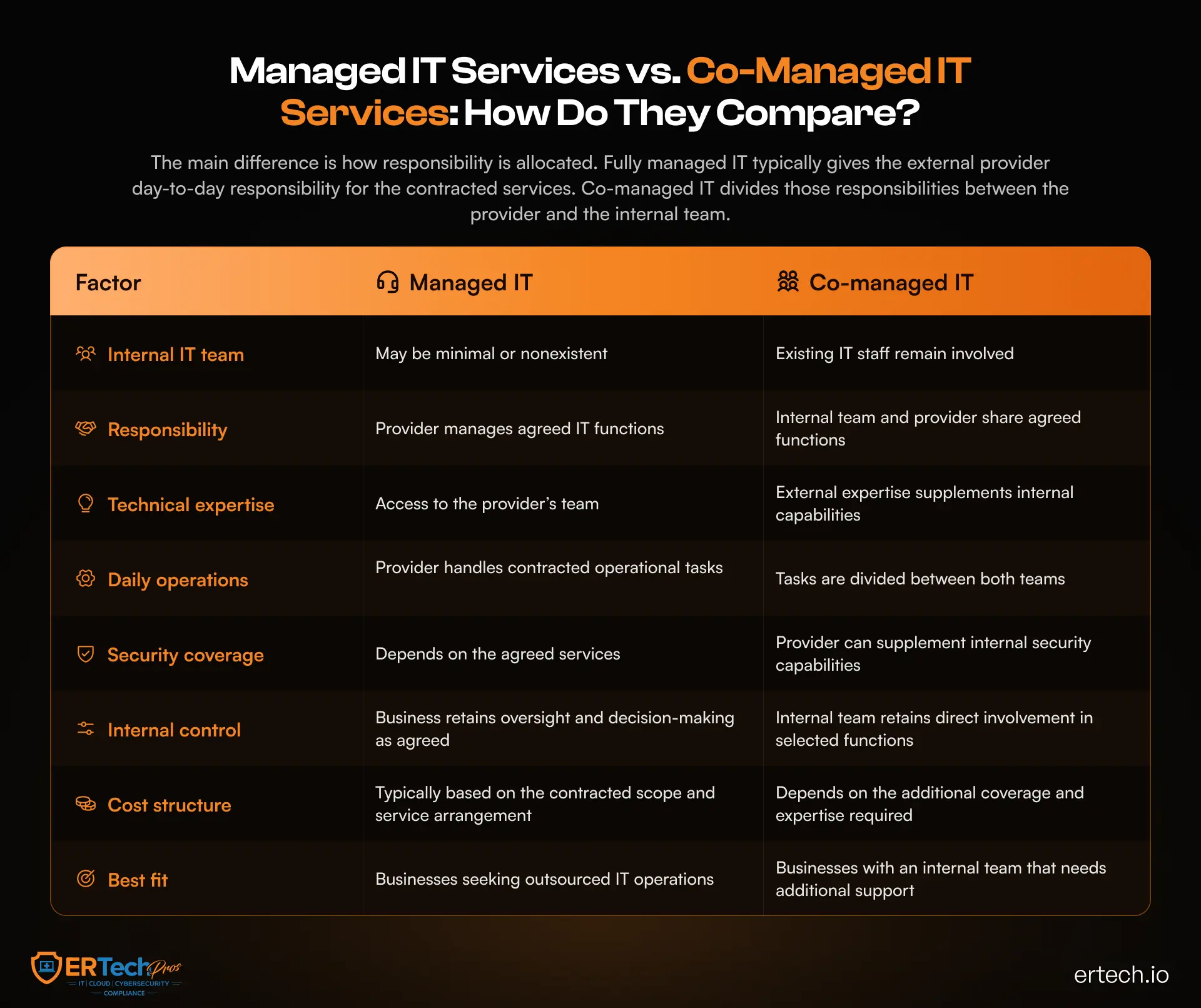
Neither model automatically provides better service or stronger security. Results depend on the provider's capabilities, service scope, implementation quality, and clear responsibilities.
Managed IT Services: Advantages and Disadvantages
Managed IT services give businesses access to external expertise and ongoing IT support without building a large internal team. However, outsourcing comes with trade-offs.
Advantages of Managed IT Services
- Specialized expertise: Access to professionals across infrastructure, cloud, endpoint management, and cybersecurity.
- Defined responsibilities: Service agreements outline provider duties and support expectations.
- Lower staffing demands: Outsource routine IT operations without hiring for every technical need.
- Broader service coverage: Agreements may include maintenance, monitoring, backups, and security services.
Disadvantages of Managed IT Services
- Less direct control: External providers manage the tasks assigned to them.
- Provider dependence: Service quality relies on the provider's capabilities and performance.
- Scope limitations: After-hours support, incident response, or major projects may incur additional costs.
- Transition requirements: Onboarding requires documentation, access coordination, and knowledge transfer.
Managed IT is a practical option for businesses that want to outsource day-to-day IT operations, provided the service scope meets their needs.
Co-Managed IT: Advantages and Disadvantages
Co-managed IT supplements an internal IT team with external expertise and capacity. Its success depends on effective collaboration.
Advantages of Co-Managed IT
- Additional capacity: External support helps internal teams manage workloads and complex requirements.
- Specialized skills: Access expertise in areas such as cloud infrastructure, network management, and cybersecurity.
- Retained internal knowledge: Existing employees continue to manage systems and business-specific needs.
- Flexible support: Outsource selected functions based on internal capabilities.
Disadvantages of Co-Managed IT
- Coordination demands: Both teams need clear communication and escalation processes.
- Overlapping responsibilities: Unclear ownership can result in duplicated or unresolved work.
- Ongoing internal oversight: The business must continue managing its retained IT responsibilities.
- Integration challenges: Existing tools and workflows may need adjustments to support collaboration.
Co-managed IT works best when internal staff and external providers have clearly defined responsibilities and shared operational goals.
What Should Businesses Evaluate Before Choosing an IT Support Model?
The decision becomes easier when businesses assess their current IT environment rather than choosing a model based on its name or advertised features.
Assess Your Internal Team's Capacity and Expertise
Start by identifying what your current IT team manages and where it needs help. A team may troubleshoot employee issues effectively but lack the specialist skills or capacity to manage complex cloud environments, advanced security operations, or large infrastructure projects.
Map recurring responsibilities against the skills and resources available. Identify tasks that are consistently delayed, functions that depend on a single employee, and projects that receive insufficient attention because daily support demands take priority.
If the business lacks the personnel needed to own its IT operations, fully managed support may be appropriate. If the team is capable but stretched thin, co-managed IT may offer a more targeted solution.
Businesses evaluating these choices can also refer to our in-house vs. managed IT guide to understand the trade-offs between internal staffing and external support.
Determine the Level of Security Coverage You Need
Cybersecurity requirements deserve special attention because having an IT team doesn't automatically mean the business has comprehensive security coverage.
A business may have employees responsible for installing updates and managing user accounts but lack continuous monitoring, advanced threat investigation, vulnerability assessments, or a coordinated incident response process.
Evaluate whether your current setup provides the visibility and expertise required to identify suspicious activity, contain threats, and recover affected systems. Consider who monitors endpoints, investigates alerts, reviews access permissions, and coordinates the response outside business hours.
Depending on the findings, you may need broader outsourced IT management or targeted support for security functions. Some providers offer dedicated cybersecurity services that can complement existing IT operations, but confirm the exact capabilities and coverage in the service agreement.
Consider Your Business's Growth Plans
An IT model that works for a 30-person company may not suit a business with 150 employees, multiple locations, or increasingly complex cloud infrastructure.
Growth can increase support requests, introduce new applications, expand endpoints, and add security and compliance requirements. A small internal team may struggle to handle these demands while also supporting strategic projects.
Managed IT provides a clear way to access broader operational resources. Co-managed IT can help an established department expand its capabilities without immediately hiring for every new requirement.
Think beyond the next few months. The preferred model should support anticipated changes in headcount, infrastructure, security requirements, and business priorities without creating unnecessary management complexity.
How Do Managed IT and Co-Managed IT Compare in Cost?
Cost comparisons should account for the complete operating model, not just the monthly provider fee. Internal salaries, recruitment, training, tools, security platforms, after-hours coverage, and the time spent coordinating IT work can all affect the overall expense.
Understand the Full Cost of Internal IT
An internal IT team involves more than salary expenditure. Businesses may also need to budget for benefits, professional development, certifications, monitoring platforms, endpoint management tools, backup solutions, and specialist security technology.
Coverage is another consideration. A small team may not be able to provide continuous monitoring or respond to every incident while maintaining regular support operations.
For smaller organizations, these requirements can make it difficult to build a team with the full range of technical skills needed. The key question is whether internal staffing delivers enough value for the business's requirements and whether external support could cover certain functions more effectively.
Compare Provider Fees With the Responsibilities Covered
Managed IT pricing varies with the number of users or devices, infrastructure complexity, support hours, service levels, security requirements, and the scope of included services.
Co-managed IT costs depend on which functions the provider takes over. A business may pay for a limited set of specialist services or a broader package that supplements its internal department.
When conducting a managed IT cost analysis, compare both models using the same operational requirements. Include provider fees, internal staffing costs, tools, implementation, contract exclusions, and any additional charges for projects or incident response.
For example, a lower monthly fee may not be the better choice if it excludes essential security monitoring, backup management, or after-hours support. Similarly, a co-managed arrangement may be of poor value if the internal team still carries the same workload while taking on additional coordination duties.
The objective is to understand the total cost of delivering the required level of IT support, not simply to select the lowest quoted price.
Evaluate the Value of Time and Risk Reduction
Cost also has an operational dimension. Delayed projects, recurring outages, unresolved technical issues, and insufficient security coverage can affect employee productivity and business continuity.
External support may free internal employees to focus on strategic projects or give a smaller organization access to capabilities it would struggle to maintain independently. However, these benefits depend on how effectively you implement the arrangement.
For a meaningful comparison, identify the problems the new model is expected to solve and establish how you'll measure success. Useful indicators may include support response times, recurring incidents, system availability, patching performance, project completion, and the time required to investigate security alerts.
When Is Managed IT the Better Choice?
Managed IT is often a strong fit when a business wants an external provider to take responsibility for most or all of its routine IT operations covered by the agreement.
Your Business Has Limited Internal IT Resources
Organizations without a dedicated IT department may need consistent support for users, devices, applications, networks, and infrastructure. Outsourcing these responsibilities gives you access to a broader technical team without requiring you to recruit and manage multiple specialists.
This is especially relevant when evaluating managed IT for small businesses, where the volume of IT work may not justify a large internal department, but the technology environment still needs ongoing attention.
You Need Broader Operational Coverage
If internal resources cannot consistently handle maintenance, monitoring, troubleshooting, and planned improvements, a managed provider can own agreed functions and establish clear service processes.
Businesses should confirm support hours, escalation procedures, response commitments, and any coverage limitations. For example, explicitly include continuous monitoring if the business requires it.
You Want to Simplify IT Management
Managing multiple technology vendors, tools, and support arrangements can create administrative work for business leaders. A managed provider may consolidate several operational responsibilities under a defined agreement.
The arrangement still requires internal oversight. Business leaders should retain visibility into performance, service costs, security priorities, and technology decisions rather than treating outsourcing as a complete transfer of accountability.
When Is Co-Managed IT the Better Choice?
Co-managed IT may be preferable when the business has a capable internal team but needs additional resources to manage its expanding responsibilities.
Your Internal Team Needs Specialist Expertise
An internal IT department may understand the company's applications, workflows, and infrastructure but lack expertise in areas such as cloud architecture, advanced threat detection, or complex network troubleshooting.
A co-managed provider can supply those capabilities as needed. This lets the business retain internal knowledge while giving employees access to external specialists for functions that require more experience.
Your IT Team Is Overloaded With Routine Work
Internal teams often have to balance user support, system maintenance, vendor coordination, security tasks, and long-term projects. When urgent requests dominate the workday, infrastructure and security improvements may be delayed.
A shared model can assign recurring operational responsibilities to the provider, freeing internal staff to focus on business-critical work.
The division of responsibilities should be specific. For example, the internal team might retain application administration and employee support while the provider manages infrastructure monitoring and escalated technical incidents.
Your Business Wants to Retain Direct IT Control
Some organizations prefer to keep internal ownership of technology strategy, application decisions, and business-specific systems. Co-managed IT can preserve that involvement while extending the team's operational reach.
This is particularly useful when internal staff provide valuable institutional knowledge that an external provider would need time to develop. The provider should work within agreed access controls, change-management procedures, and escalation paths to support the existing team.
Questions to Ask Before Choosing an IT Support Model
Before signing an agreement, ask prospective providers questions that clarify their capabilities, responsibilities, and service expectations.
- What services are included? Confirm whether the agreement covers help desk support, infrastructure management, security monitoring, backups, and other required functions.
- What support hours and response times are offered? Understand the provider's availability, escalation process, and contractual service-level commitments.
- How will cybersecurity responsibilities be divided? Determine who monitors systems, investigates alerts, responds to incidents, and coordinates remediation.
- How will the provider work with our existing IT team? Ask about communication channels, shared tools, documentation, and task ownership.
- What additional costs should we anticipate? Clarify charges for projects, after-hours support, emergency response, onboarding, and services outside the agreed scope.
- How will performance be measured? Identify the reports and metrics used to evaluate service quality, system availability, incident resolution, and other agreed objectives.
- What happens if we change providers? Understand documentation ownership, access revocation, data handling, and transition assistance.
These questions help businesses compare providers on operational fit and accountability, not just advertised features or monthly pricing.
How ER Tech Pros Can Support Your IT Strategy
Choosing the right service model is only the first step. Businesses also need a provider that understands their technology environment, clearly defines responsibilities, and supports evolving operational and security requirements.
ER Tech Pros provides managed IT and cybersecurity capabilities designed to help businesses maintain their technology environments, address technical issues, and manage security risks.
Depending on the scope of engagement, support can include:
- Managed IT support: Ongoing assistance with IT operations, infrastructure, and technology management.
- 24/7 NOC and SOC monitoring: Network and infrastructure oversight alongside security monitoring and incident investigation.
- Endpoint protection: Endpoint detection and response (EDR) capabilities to identify and investigate suspicious activity.
- Cloud and infrastructure management: Support for business environments hosted across cloud and on-premises infrastructure.
- Backup and disaster recovery: Backup oversight and recovery capabilities to help businesses prepare for service disruptions.
- Vulnerability assessment and penetration testing: Security assessments to identify weaknesses and help prioritize remediation.
The appropriate combination depends on your current environment, internal resources, and service requirements. Businesses with existing IT departments should decide which responsibilities stay internal and which ER Tech Pros can handle. Organizations seeking outsourced support should define the operational scope and service expectations from the outset.
Through its managed IT services, ER Tech Pros can help businesses evaluate their requirements and choose the right approach to ongoing IT management.
Choose an IT Support Model That Fits Your Business
The decision between managed IT and co-managed IT depends on your resources, the responsibilities you need covered, and how much involvement you want to retain.
A business without a dedicated IT department may benefit from an external provider that manages its agreed technology operations. An organization with an established IT team may gain more value from a shared arrangement that adds specialist expertise and capacity.
Before deciding, document your current responsibilities, identify coverage gaps, assess your security requirements, and compare the total cost of each approach. Confirm the service scope, escalation procedures, response commitments, and ownership of critical systems.
For businesses evaluating the top benefits of managed IT services for small and mid-sized businesses, the most important consideration is how well the model supports day-to-day operations while leaving room for growth and security improvements.
Need Help Choosing the Right IT Support Model?
ER Tech Pros can help you assess your current IT environment, identify areas that need additional support, and explore an approach aligned with your business priorities.
Got Questions?
We've Got Answers
Find clear answers to common questions that help guide your IT operations.
Related Content

Halloween Cybersecurity: 5 Scary Online Scams That Could Haunt Your Business
How to Build a Cybersecurity Incident Response Plan for Your Business