IT Disaster Recovery Plan for Small Businesses: A Complete Guide
An IT disruption can quickly affect critical business operations. Learn how to build a small business disaster recovery plan that helps your team prepare for downtime and recover essential systems with greater control.

A small business can lose access to critical systems for many reasons: a failed server, a corrupted database, a cloud service outage, a power disruption, human error, or a cybersecurity incident. For a company that relies on digital systems for sales, communication, accounting, customer records, or daily operations, even a short disruption can affect far more than the IT department.
The risk is particularly significant for smaller organizations with limited internal resources. IBM reports that 40% of small businesses do not reopen after a disaster, while another 25% fail within the following year. The statistic highlights why recovery cannot depend on improvised decisions made after systems are already unavailable.
A backup may protect important data, but recovery involves much more than having a copy of your files. Businesses need to know which systems are critical, how quickly they must be restored, what dependencies to recover first, and who is responsible for recovery decisions.
This guide explains how to develop a disaster recovery plan for a small business, what to prioritize, and how to keep the plan aligned with the way your business actually operates.
Is Your Business Prepared for an IT Disruption?
What Should an IT Disaster Recovery Plan Protect?
A small business disaster recovery plan should start with the business itself, not with a list of backup tools or recovery technologies. The goal is to identify the systems, data, applications, and processes the business depends on every day, then determine what happens if one becomes unavailable.
For one business, that could mean losing access to a customer database. For another, it could prevent employees from processing payments, accessing shared files, communicating with customers, or using a core cloud application. The specific risks vary by business, but the planning question remains the same: What does the business need to keep operating?
Identify Critical Business Systems
Begin by documenting the technology that supports essential operations. This may include:
- Business applications and databases
- File servers and shared storage
- Email and collaboration platforms
- Accounting and payment systems
- Customer and operational databases
- Network and internet infrastructure
- Cloud applications and services
- Employee devices and endpoints
- Identity and authentication systems
Not every system needs to be restored at the same time. Classifying systems by operational importance helps establish recovery priorities later in the plan.
Understand the Business Impact of System Downtime
Identifying critical systems is only the first step. The plan also needs to establish what their unavailability means for the business.
If an accounting platform goes offline, can invoices still be processed? If a customer database becomes inaccessible, can employees continue serving customers? If the network fails, which applications and services become unavailable with it?
These relationships reveal system dependencies and help determine which technologies require the shortest recovery times. They also help businesses understand how a compromise in one environment could affect connected systems through lateral movement, making system dependencies an important consideration during both incident containment and recovery.
Document People and Recovery Responsibilities
Technology alone cannot execute a recovery plan. Someone needs to initiate the response, coordinate technical recovery, communicate with employees and stakeholders, and approve major decisions.
The plan should therefore identify internal decision-makers, IT personnel, external technology providers, and other individuals involved in recovery. It should also define who can authorize actions such as restoring systems, isolating infrastructure, or returning recovered services to production.
Clearly assigned responsibilities reduce uncertainty during an incident and help prevent critical recovery decisions from depending on a single person who may be unavailable when the business needs them.
How to Set Recovery Objectives for Critical Systems
Once a business knows which systems are essential, the next question is how quickly each one needs to come back online and how much data the business can afford to lose. These decisions form the technical foundation of an IT disaster recovery plan.
Two metrics are particularly important: Recovery Time Objective (RTO) and Recovery Point Objective (RPO).
Define Recovery Time Objective for Each System
Recovery Time Objective (RTO) is the maximum acceptable time required to restore a system or business process after a disruption.
The appropriate RTO depends on how directly a system affects business operations. A customer-facing application or payment system may require a much shorter recovery window than an internal reporting platform.
For example, a small business could establish targets such as:
- Critical business application: 1 hour
- Accounting platform: 4 hours
- Internal reporting system: 24 hours
These are planning examples rather than universal targets. Each business should establish RTOs based on operational requirements, financial impact, customer commitments, and available recovery resources.
Establish Recovery Point Objectives for Business Data
A Recovery Point Objective (RPO) defines how much recent data the business can afford to lose after an outage or other disruption.
An RPO of 15 minutes means the recovery strategy should aim to limit potential data loss to approximately the previous 15 minutes. An RPO of 24 hours indicates that the business may be able to tolerate the loss of up to a day's worth of data.
RPO therefore influences how frequently data needs to be backed up or replicated.
For example, a transaction database that changes continuously may require frequent replication, while an internal document repository that changes less often may require less frequent recovery points.
Match Recovery Objectives to Business Priorities
Don’t select RTO and RPO simply because a particular technology can meet them. The targets need to reflect what the business actually requires.
A practical recovery plan can document each critical system, along with its RTO, RPO, dependencies, recovery method, and system owner. This creates a clear connection between business requirements and the technical controls needed to meet them.
Once these objectives are defined, the business can evaluate whether its existing backup and recovery capabilities can realistically support them.
Build a Backup Strategy That Supports Recovery
Backups are a fundamental component of disaster recovery, but having automated copies of business data does not automatically mean the business can recover from an outage.
A reliable small business disaster recovery plan should define what to back up, how often to protect it, where to store recovery copies, how long to retain them, and how to verify restoration.
Protect Critical Data and System Configurations
A recovery strategy should account for more than individual documents.
Depending on the environment, recovery data may include:
- Databases and application data
- File shares and business documents
- Virtual machines
- Server images
- Application configurations
- Network configurations
- Identity and authentication data
- Critical cloud workloads
This matters because restoring a database without the application or configuration required to use it may not return the business to an operational state.
Maintain Multiple Recovery Options
A single backup destination can create a single point of failure. Businesses should consider maintaining recovery copies across appropriately separated storage locations and infrastructure.
Depending on the environment, this may involve local backups for faster restoration alongside offsite or cloud-based copies for protection against site-level disruptions.
For cyber incidents, recovery copies should also be protected from unauthorized modification or deletion. Controls such as immutability, restricted administrative access, separate credentials, retention policies, and monitoring can help prevent an attacker who compromises production systems from compromising the recovery environment at the same time.
Monitor Backups Instead of Assuming They Work
A backup job showing “successful” does not necessarily prove that the business can restore the required system.
Backup monitoring should identify failed jobs, incomplete backups, unexpected changes, storage capacity issues, and other conditions that could affect recoverability.
Restoration should also be tested periodically. A business should verify that recovery points are usable and that critical applications, databases, and systems can actually be restored within their defined recovery objectives.
The goal is not simply to have backups available. It is to maintain recovery points that can support the RTO and RPO requirements established for the business.
Plan the Recovery Process From Disruption to Restoration
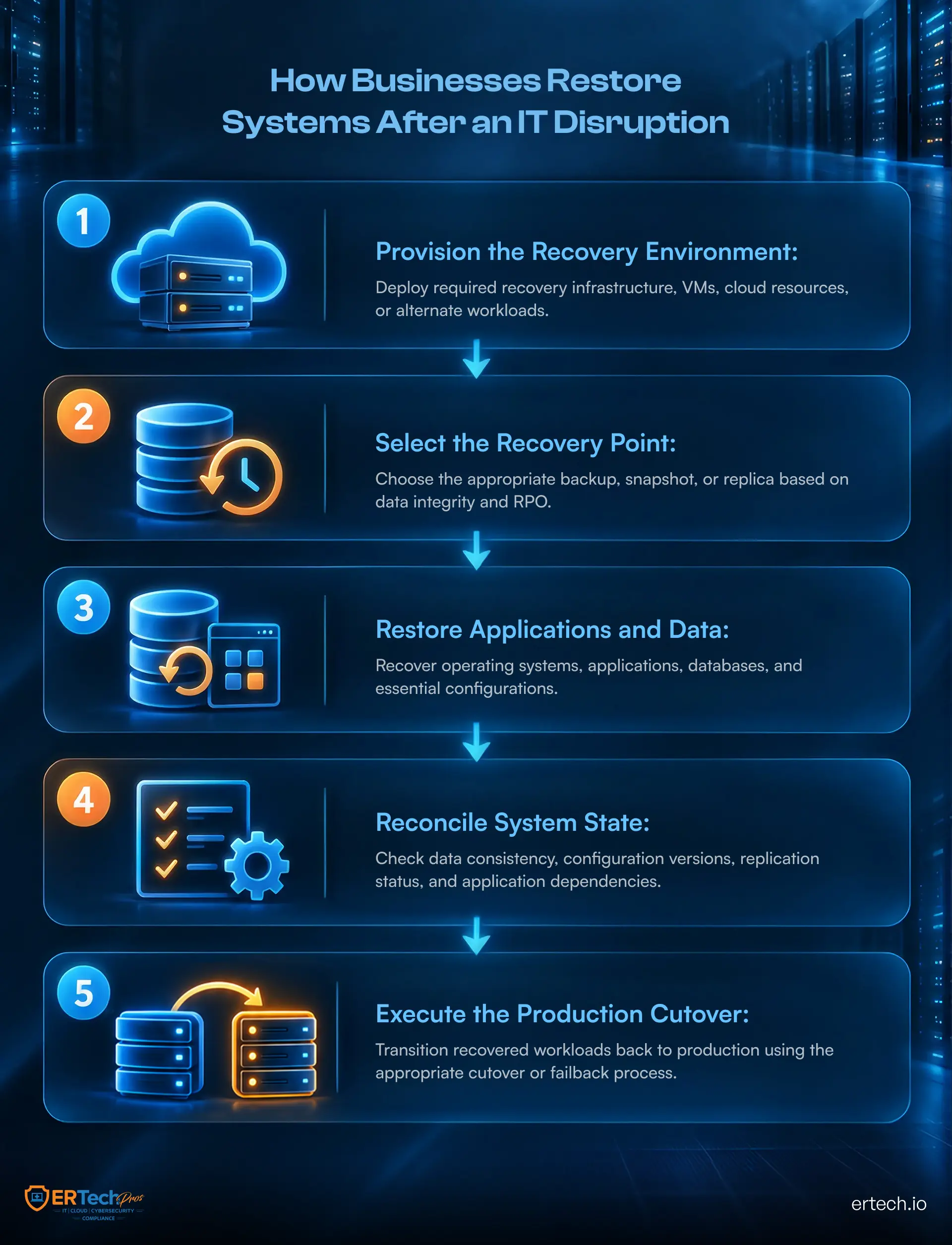
With defined recovery objectives and an established backup strategy, the next step is to determine how systems will be restored. A disaster recovery plan should provide a clear recovery sequence so technical teams don't have to decide what to restore first while the business is already experiencing downtime.
The recovery process should account for infrastructure, applications, data, identity systems, network connectivity, and their dependencies. Restoring these components in the wrong order can leave critical applications unavailable even after the underlying data is recovered.
Establish a Recovery Sequence
Recovery should follow the dependencies identified during planning. Core infrastructure such as network connectivity, identity services, authentication, and required servers may need to be restored before business applications can function properly. Network security controls should also remain operational during restoration to protect systems as they are brought back online.
Once the underlying environment is available, recovery can proceed according to the business priorities established through RTO and RPO targets. Critical applications and their associated databases should generally take precedence over systems that can tolerate longer periods of downtime.
Document the recovery sequence clearly enough that responsible teams understand what needs to happen, what must be completed first, and which systems depend on each recovery step.
Account for Different Disruption Scenarios
The recovery process should also reflect the type of disruption involved. A failed server may require hardware replacement or system restoration, while a cloud service outage may require temporary workarounds or alternative access methods. Human error may require restoring a previous data state, whereas a cybersecurity incident may require isolating systems before recovery begins.
For example, recovery after ransomware may require additional investigation before restoring systems or data. Recovery teams may need to confirm that compromised accounts, endpoints, and infrastructure have been contained and that the recovery environment has not been affected. A ransomware response plan can define the incident-specific actions that need to occur alongside the broader disaster recovery process.
Planning for these scenarios prevents the recovery process from relying on a single restoration procedure that may not apply to every type of disruption.
Validate Systems Before Returning Them to Production
A system should not be considered recovered simply because it has been restored or powered on. Teams should verify application functionality, data integrity, user access, integrations, and dependent services before returning the system to normal operations.
Validation should also confirm that security controls remain in place. This can include reviewing administrative accounts, permissions, authentication mechanisms, logging, and access control before users are given normal access.
Documenting these validation steps helps ensure recovery restores a usable, secure operating environment rather than simply bringing individual systems back online.
Test Whether Your Recovery Plan Actually Works
A documented recovery process is only useful if the business can execute it under realistic conditions. Testing helps identify gaps that may not be visible when a plan exists only as documentation.
Testing should cover both decision-making and technical recovery. It should also produce measurable results that can be compared against the RTO and RPO targets established for critical systems.
Start With Tabletop Exercises
A tabletop exercise walks key personnel through a simulated disruption without taking production systems offline. Participants can work through scenarios such as a server failure, extended cloud outage, data corruption, or cybersecurity incident.
The exercise should establish whether the right people know when to activate the plan, who is responsible for each decision, how technical recovery will be coordinated, and how employees and stakeholders will be informed.
These exercises can also expose practical issues such as outdated contact information, unclear responsibilities, missing documentation, or dependencies that were not included in the original plan.
Perform Technical Recovery Tests
Tabletop exercises cannot confirm whether backups and recovery infrastructure will actually work. Technical testing should therefore include restoration of selected systems, databases, applications, or recovery environments.
Where possible, the test should measure the actual time required to restore critical services and verify whether recovered data meets the defined RPO. Then compare the results with the established RTO and RPO targets.
For businesses using ransomware resistant backups, testing should also confirm that protected recovery copies can be accessed and restored through the intended recovery process.
Update the Plan After Testing
Every recovery test should produce documented findings. If a system takes longer to restore than its RTO, a backup lacks required data, or a dependency was overlooked, update the plan accordingly.
The same principle applies when the business changes its technology environment. New applications, cloud services, infrastructure, employees, vendors, and business processes can all affect recovery requirements.
Testing therefore becomes an ongoing feedback loop: define recovery requirements, test them, identify gaps, update the plan, and test again.
How Does ER Tech Pros Support Disaster Recovery?
A disaster recovery plan needs more than documented procedures. Businesses also need reliable infrastructure, monitored systems, protected recovery environments, and technical support to execute those procedures when disruption occurs.
ER Tech Pros helps businesses build and maintain recovery capabilities around their technology environment, operational priorities, and recovery requirements.
Our approach includes:
- Backup and recovery management to maintain reliable recovery points
- Cloud and infrastructure management for critical business systems
- 24/7 NOC and SOC monitoring for infrastructure and security events
- Endpoint Detection and Response (EDR) to identify and investigate suspicious activity across business endpoints
- Recovery testing and validation to identify gaps before an actual disruption
- Cybersecurity services supporting prevention, detection, response, and recovery
Through managed IT services, ER Tech Pros can provide the ongoing technical oversight required to keep these capabilities operational as the business and its technology environment change.
The objective is straightforward: when disruption occurs, businesses should have a documented recovery process, protected data, and the technical support required to execute the plan.
Your Recovery Plan Should Be Ready Before Downtime
A disruption can expose every weakness in a business’s recovery process at once. Which systems need to come back first? Can critical data actually be restored? Who is responsible for making recovery decisions? How quickly can operations resume?
A well-designed small business disaster recovery plan answers these questions before an incident occurs. It defines recovery priorities, RTO and RPO targets, protected backups, and system dependencies. It also gives your team a clear, tested process for restoring operations.
The objective is not simply to restore technology. It is to restore reliable business operations with the right systems, data, and controls in place.
Don’t Let an IT Disruption Define Your Recovery Plan
Find out whether your backups, infrastructure, and recovery processes are prepared to support your business when downtime occurs.
Got Questions?
We've Got Answers
Find clear answers to common questions that help guide your IT operations.
Related Content

Cybersecurity Awareness Month: 14 Security Steps Every Business Should Take in 2026

Medusa Ransomware: What Businesses Can Learn From the Attack