Cybersecurity Awareness Month: 14 Security Steps Every Business Should Take in 2026
Cybersecurity Awareness Month is more than an annual reminder. Explore 14 practical security steps businesses can use in 2026 to identify gaps, reduce exposure, and improve incident readiness.
October arrives with the usual cybersecurity reminders: update your passwords, watch for suspicious emails, and keep your software patched. But for businesses in 2026, cybersecurity requires more than another annual reminder.
Consider a mid-sized company preparing for Cybersecurity Awareness Month. Its employees use cloud applications, access business systems from personal devices, and increasingly use AI tools in their daily workflows. Its security perimeter is no longer defined by the office network.
The risk is growing more complex. IBM's 2026 report found that 1 in 4 malicious breaches were AI-enabled, with those breaches costing an average of $6 million. IBM also reported that AI-enabled attacks increased 56% compared with the previous year.
That changes what a useful awareness campaign should accomplish.
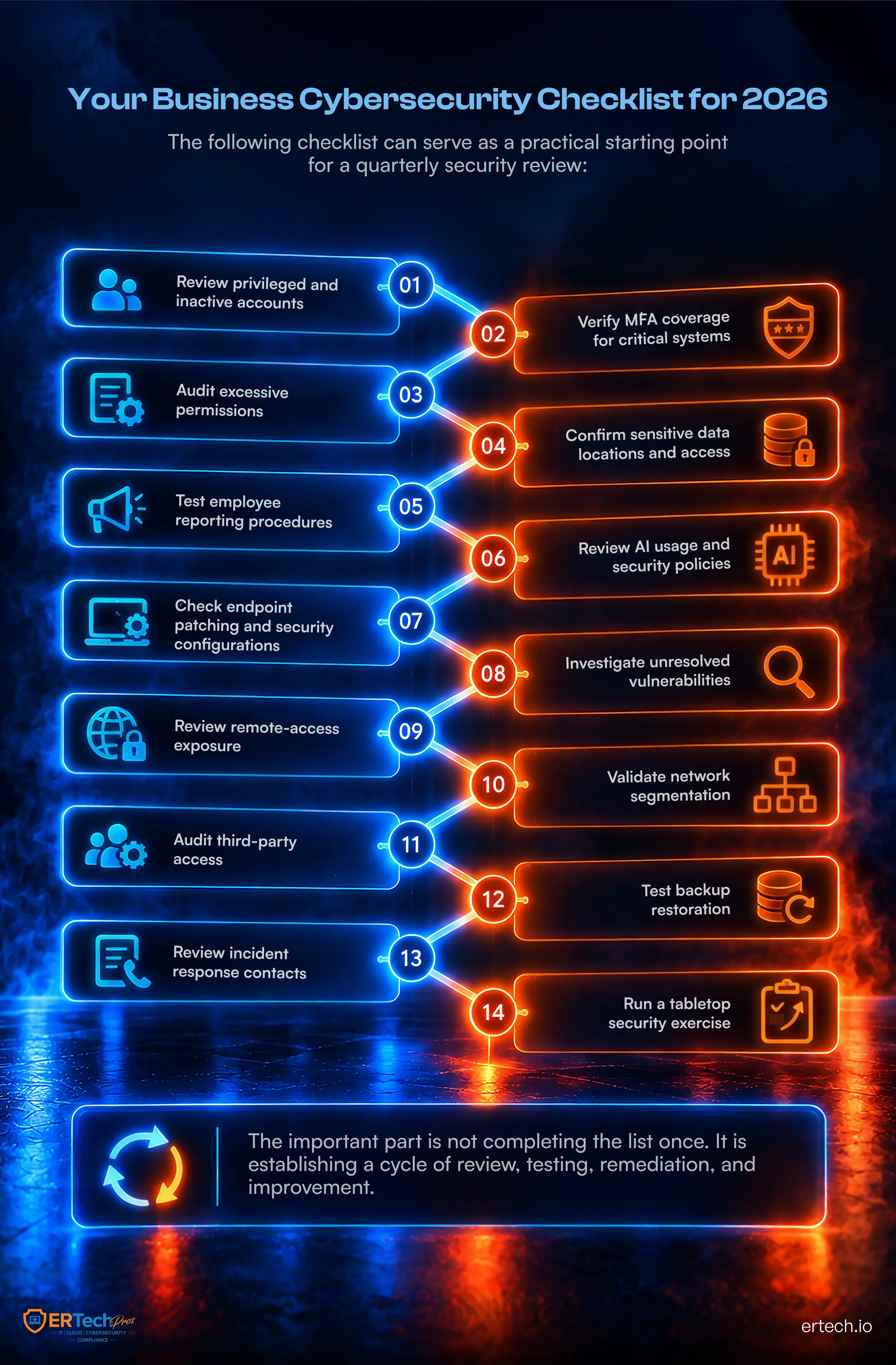
Instead of treating October as a month for reminders, businesses can use Cybersecurity Awareness Month as a checkpoint: What happens if an employee account is compromised tomorrow? Can the business detect unusual activity? Are critical systems segmented? Can compromised credentials be contained? Are backups actually recoverable?
This guide turns those questions into 14 security steps every business should take in 2026!
Is Your Business Protected Before the Next Attack?
1. Secure the Identities That Control Business Access
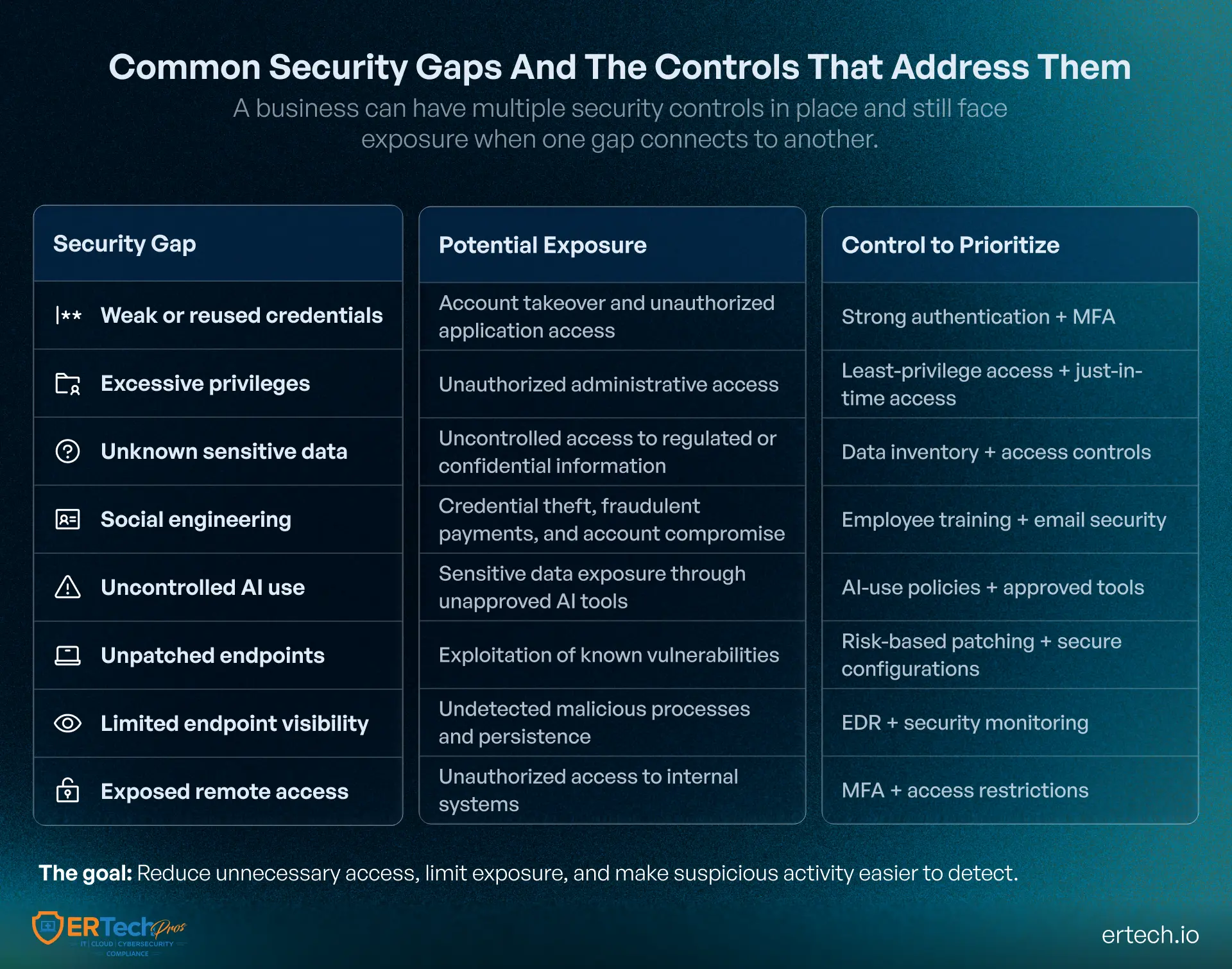
A business can have sophisticated security technology and still be exposed through one compromised account. The first step is understanding which identities could give an attacker access to sensitive systems, financial information, administrative tools, or customer data.
Step 1: Strengthen Password and Authentication Controls
Begin with the accounts that matter most, particularly:
- Administrator and privileged accounts
- Executive and finance accounts
- Remote-access accounts
- Accounts connected to critical applications
Review password policies, eliminate shared credentials, and enable multi-factor authentication wherever appropriate. Password policies should also reflect modern password length best practices, emphasizing longer, unique passwords or passphrases rather than relying solely on complex character combinations.
Treat authentication as a layered control. A strong password can still be compromised, so businesses should combine it with MFA, conditional access, device verification, and monitoring for unusual sign-in behavior.
Step 2: Reduce Standing Privileges
Employees rarely need permanent access to every system available to them.
Review administrative accounts, service accounts, shared accounts, and permissions assigned to users who have changed roles. Where practical, use just-in-time access so you grant elevated privileges only when needed and for the required duration.
This reduces the potential impact of a stolen credential. An attacker who compromises a standard account should not automatically inherit administrative control over the environment.
Step 3: Know Where Sensitive Data Lives
You cannot adequately protect information that the business cannot identify.
Create an inventory of sensitive information, including:
- Customer and employee records
- Financial information
- Intellectual property
- Credentials and authentication data
- Personally identifiable information (PII)
Then determine who can access that information, where it is stored, how it moves between systems, and how long it needs to be retained.
Data visibility gives the rest of the security program something concrete to protect.
2. Make Employees Part of the Security Perimeter
Technology can block many attacks, but employees remain an important part of the attack surface. The objective is not to expect employees to recognize every sophisticated threat. It is to give them clear behaviors for identifying, verifying, and reporting suspicious activity.
Step 4: Train Employees Against Modern Deception
An employee receives a message from a senior executive asking for an urgent payment. Another receives a document that appears to come from a familiar vendor. These scenarios rely on social engineering rather than obvious technical exploits.
Regular cybersecurity awareness training should cover:
- Credential theft and suspicious login requests
- Impersonation and fraudulent payment instructions
- Malicious links and unexpected attachments
- Vendor and executive impersonation
- AI-generated scams and manipulated content
Businesses should reinforce that training with email filtering, attachment scanning, URL protection, domain authentication, and identity controls. Employees should have a clear process for reporting suspicious messages, while technical controls should reduce the number of malicious messages reaching them in the first place.
Step 5: Establish Rules for AI Use
AI introduces another layer to employee security awareness.
Employees may use public AI tools to summarize documents, generate content, analyze data, or automate routine tasks. Without clear policies, employees may enter sensitive information into tools the organization has not approved or evaluated.
Define which AI tools employees can use, what information can be entered, which applications require approval, and how AI-generated content should be reviewed.
In 2026, awareness needs to cover not only phishing emails and passwords but also how employees interact with AI systems.
3. Secure the Devices and Access Points Employees Rely On
An employee's laptop can become an entry point to applications, credentials, files, and internal systems. That makes endpoint visibility essential even when employees work outside the corporate office.
Step 6: Keep Devices Patched and Configured Securely
Maintain a current inventory of laptops, desktops, mobile devices, servers, and other connected endpoints.
Patch operating systems and applications according to risk, prioritizing internet-facing and actively exploited vulnerabilities. Remove unsupported software wherever possible.
Standardize security configurations by:
- Disabling unnecessary services
- Enforcing device encryption
- Restricting unauthorized applications
- Establishing secure baseline configurations
- Reviewing configuration drift across managed devices
Step 7: Detect Suspicious Endpoint Behavior
Traditional antivirus alone may not provide enough visibility into modern attacks.
Endpoint detection and response (EDR) can help security teams investigate suspicious processes, unusual execution patterns, unauthorized changes, credential activity, and other indicators of compromise.
The important question is not simply whether malware was blocked. It is whether the organization can see what happened when something unusual occurs and respond before the activity spreads.
Step 8: Review Remote Access
Remote work has made access from outside the office routine. That makes remote access infrastructure an important security control point.
Review externally accessible services such as:
- VPN connections
- Remote desktop services
- Cloud applications
- Administrative interfaces
- Other internet-facing access points
For each, remove unused accounts and services, enforce MFA, restrict administrative access, and monitor unusual login behavior.
Remote access should provide employees with the connectivity they need without creating unnecessary pathways into critical systems.
4. Limit How Far an Attacker Can Move
Stopping every initial compromise is unrealistic. A stronger strategy assumes that an attacker may eventually get through and focuses on limiting what happens next.
Step 9: Segment Critical Systems
A compromised workstation should not automatically provide a route to every server, database, application, and backup system.
Review network security architecture and identify where segmentation can reduce unnecessary communication between systems.
Separate critical infrastructure from ordinary user devices where appropriate. Restrict administrative interfaces, isolate sensitive environments, and control which systems can communicate with one another.
Segmentation turns a single compromise into a contained security event rather than allowing it to become a business-wide incident.
Step 10: Apply Zero-Trust Principles to Access
The traditional assumption that users inside the corporate network can be trusted no longer fits modern hybrid environments.
A zero-trust approach continuously evaluates identity, device, application, location, and access context rather than automatically trusting a connection because it originates from an internal network.
For organizations working with managed service providers, zero-trust for MSPs can also help establish clearer boundaries around administrative access, delegated privileges, and third-party connections.
The principle is straightforward: verify access based on need and context, then limit what that access can reach.
Step 11: Monitor the Environment for Signs of Compromise
Security teams need visibility across identities, endpoints, applications, networks, and cloud environments.
Monitoring should look for signals such as:
- Unusual authentication patterns
- Unexpected privilege changes
- Administrative actions outside normal patterns
- Large or unusual data transfers
- Suspicious processes
- Activity outside normal business hours
Detection becomes especially important when attackers use legitimate credentials or tools. The activity may look normal in isolation but become suspicious when viewed in context.
5. Extend the Security Boundary Beyond Your Employees
Your business may have strong internal controls and still be exposed through a vendor, software provider, contractor, or other external partner.
Step 12: Evaluate Third-Party Access
Create an inventory of vendors that connect to business systems or handle sensitive information.
For each third party, review:
- Systems and data the vendor can access
- Authentication and MFA requirements
- Account provisioning and deprovisioning
- Access privileges and connection methods
- Security requirements in the vendor agreement
- Offboarding procedures when the relationship ends
A structured vendor risk management process should also consider security requirements during procurement rather than waiting until after a vendor has been granted access.
Third-party security is part of business security because your organization can inherit risk from systems it does not directly operate.
6. Make Recovery Part of Prevention
A business cannot assume that prevention controls will stop every incident. Resilience depends on having a recovery strategy that works when those controls fail.
Step 13: Protect and Test Backups
Protect backups from the same attack that threatens production systems.
Use appropriately isolated, access-controlled backup environments, maintain multiple recovery points, and regularly test whether critical systems and data can be restored.
Ransomware-resistant backups are especially important because attackers may attempt to encrypt, delete, or compromise accessible backups before disrupting production systems.
A backup that has never been restored successfully is an assumption, not a tested recovery capability.
Step 14: Practice the Response Before an Incident
Imagine it is 9:15 on a Monday morning.
An employee reports that their account is behaving strangely. Security monitoring shows an unusual login. A second endpoint begins communicating with an unfamiliar system. Finance reports that a shared file repository is behaving unexpectedly.
Who investigates?
Who can disable the account?
Who isolates the affected device?
An incident response plan should answer those questions before an emergency. Run tabletop exercises, document escalation paths, define decision-making authority, and test communication procedures.
Businesses should also review their cybersecurity services regularly to confirm that monitoring, detection, response, vulnerability management, backup oversight, and incident support match the organization's current environment.
How ER Tech Pros Helps Businesses Put These Security Steps Into Practice
A cybersecurity checklist is only useful when businesses implement, monitor, and maintain the controls behind it. For many businesses, that means bringing together capabilities that may otherwise sit across different tools, vendors, and internal teams.
ER Tech Pros provides managed IT and cybersecurity services designed to help businesses address these security requirements through ongoing protection and support.
Protect Identities, Endpoints, and Access
Strong security starts with controlling who can access business systems and what they can do once inside. ER Tech Pros helps businesses strengthen access controls, endpoint protection, vulnerability management, and security policies to reduce the chances for compromised credentials or devices becoming larger incidents.
Endpoint monitoring and security controls provide visibility into suspicious activity, while managed support helps businesses address vulnerabilities and security issues as they emerge.
Monitor for Threats Around the Clock
Cyber threats do not follow business hours. ER Tech Pros provides 24/7 NOC and SOC monitoring to help identify suspicious activity and respond to potential security events across the environment.
Security monitoring can help organizations investigate unusual authentication activity, endpoint behavior, network events, and other indicators that may signal an emerging threat.
Strengthen Vulnerability and Network Security
Unpatched systems, exposed services, misconfigured infrastructure, and unnecessary access can create opportunities for attackers. ER Tech Pros supports vulnerability management and network security as part of a broader approach to reducing the organization's attack surface.
The focus is not simply on identifying security gaps, but on helping businesses prioritize and address them before they become larger operational risks.
Prepare for Incidents and Recovery
When an incident occurs, businesses need more than detection. They need a coordinated response and a reliable path toward recovery.
ER Tech Pros supports businesses with incident response, security monitoring, backup and recovery solutions, and ongoing IT expertise. This helps organizations prepare for the possibility that preventive controls may be bypassed and ensures recovery is part of the overall security strategy.
Build a Security Program That Continues After October
Cybersecurity Awareness Month gives businesses a timely opportunity to evaluate how well their security strategy holds up against changing threats, technologies, and business operations. Rather than treating October as an annual training exercise, organizations can use it to establish a security baseline and identify where ongoing review, testing, or remediation is needed.
For businesses evaluating cybersecurity best practices, that means creating a repeatable approach to security rather than relying on one-time awareness activities. Policies, technical controls, employee practices, third-party relationships, and recovery capabilities should be reviewed as the environment changes.
For businesses that lack the internal resources to monitor threats continuously, managed security support can provide additional visibility and response capabilities. ER Tech Pros helps businesses strengthen their cybersecurity posture with continuous monitoring, endpoint protection, access controls, vulnerability management, backup and recovery, and incident response support.
Make Cybersecurity Awareness Month the starting point for a stronger security baseline, not the end of the conversation.
Build a Stronger Security Defense
Evaluate your current protections and uncover areas that need attention.
Got Questions?
We've Got Answers
Find clear answers to common questions that help guide your IT operations.
Related Content
Medusa Ransomware: What Businesses Can Learn From the Attack
How to Develop a Ransomware Recovery Plan & Prevent an Attack