Zero Trust Security for Small and Mid-Sized Businesses: A Practical Guide
Zero Trust security helps small and mid-sized businesses control access and protect critical resources across on-premises, cloud, and remote work environments. Learn how zero trust works and how to build a practical implementation roadmap that aligns with your business needs.
Imagine a 75-person company where employees access business applications from the office, home, and client locations. Its accounting software runs in the cloud, shared files sit on a central server, and an external IT provider manages several systems.
An employee receives a convincing phishing email and unknowingly shares their login credentials. The attacker signs in with those credentials and finds the compromised account can access shared folders, business applications, and other internal resources.
The company has antivirus software, a firewall, and password policies. Yet once the attacker gets past the initial defenses, the account's existing access makes further intrusion easier.
This is where zero trust security becomes important.
According to Verizon's report, ransomware was involved in 88% of breaches affecting small and medium-sized businesses, compared with 39% at larger organizations. The finding highlights the importance of controls that limit what an attacker can access after compromising an account or device.
For small and mid-sized businesses, zero trust reduces that exposure without requiring the same security infrastructure as a large enterprise.
This guide explains what zero trust means and how it applies to everyday business operations.
Don't Wait for Unauthorized Access to Expose Your Security Gaps
What Is Zero Trust Security, and Why Does It Matter for SMBs?
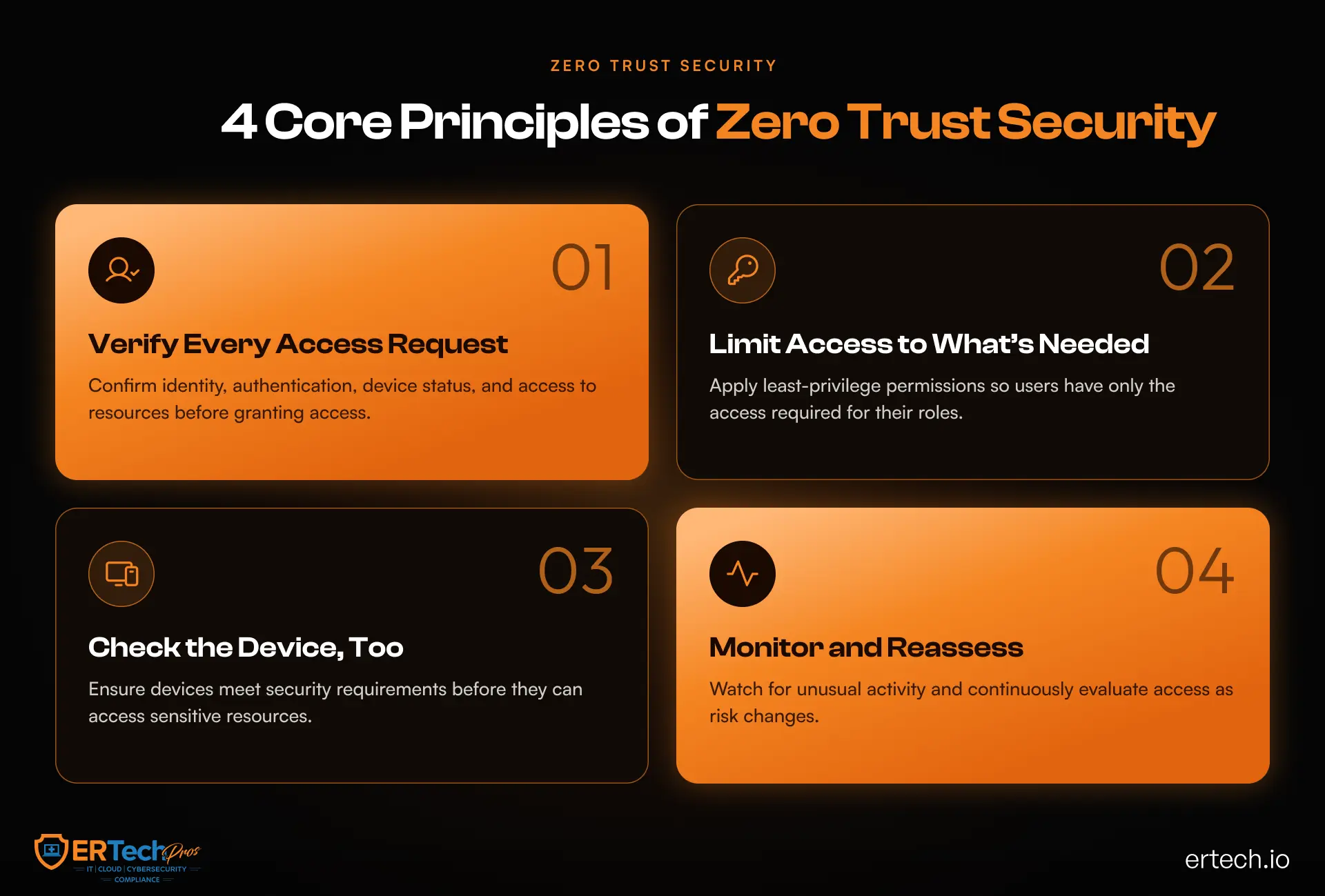
Zero trust is a security approach built on a straightforward principle: no user, device, or application should automatically receive trust simply because it is inside the company network or has connected successfully before.
Instead, access decisions are based on identity, permissions, device security, the requested resource, and other relevant signals. Access is granted only when the request meets the organization's security requirements.
NIST describes zero trust architecture as an approach that shifts security away from relying on network boundaries and toward protecting individual resources, users, and assets. Its zero trust architecture guidance provides the technical foundation for this approach.
For a smaller business, the principle has practical implications. An employee who needs access to the accounting system should not automatically have administrative access to the company server. Don't treat a laptop that fails security checks like a trusted, compliant device.
This is the foundation of zero trust security for small and mid-sized businesses: verify access, restrict permissions, and protect each resource according to its risk.
How Zero Trust Differs From Perimeter-Based Security
Traditional network security often focuses on protecting the boundary between an organization's internal network and the outside world. Firewalls, VPNs, and gateway controls remain important, but they cannot independently establish that every user or device inside a network is safe.
Zero trust adds identity-aware and resource-specific controls to that foundation.
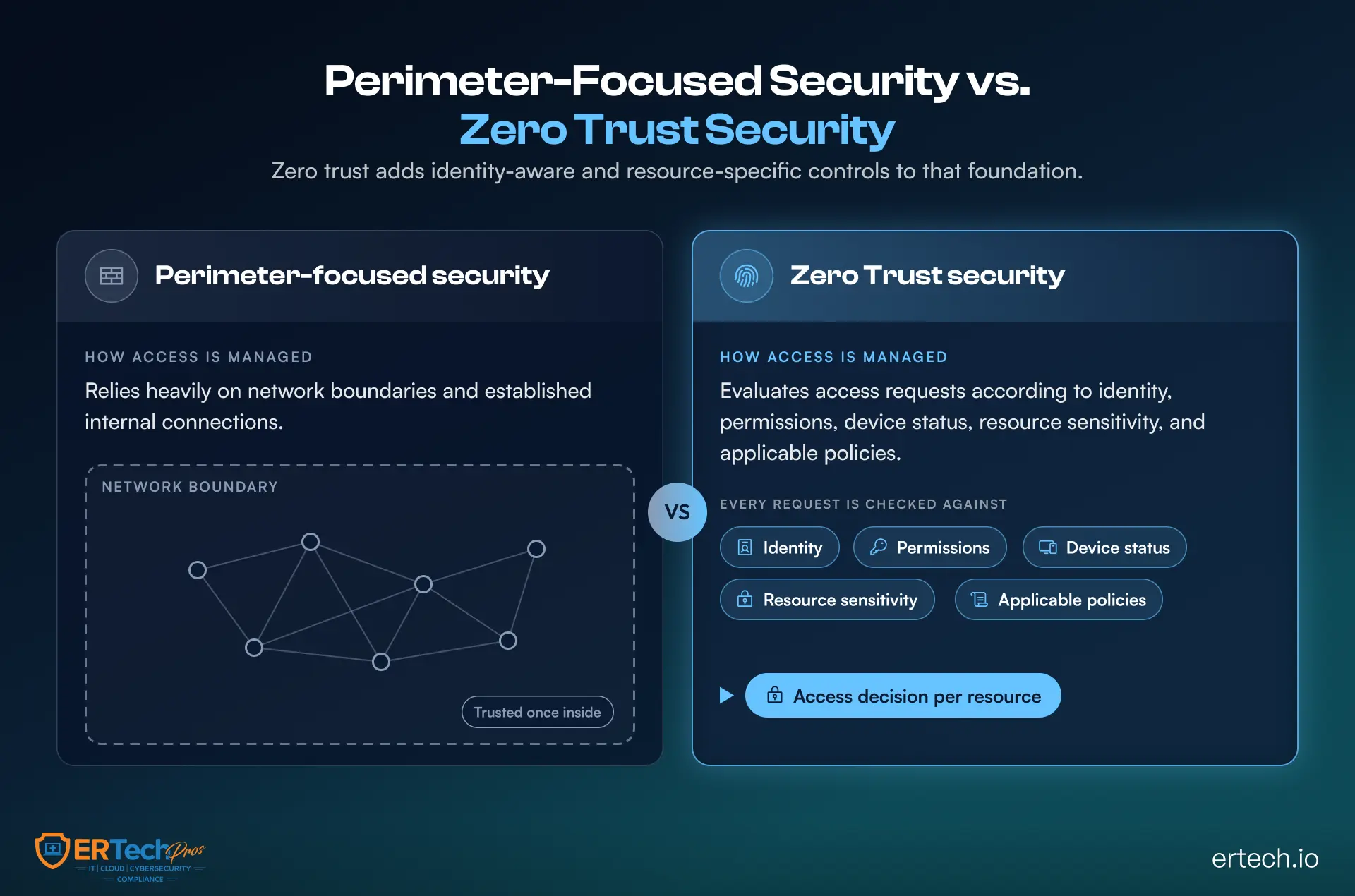
If you’re looking for practical network security tips for small businesses, zero trust provides a useful framework for reviewing how users, devices, applications, and systems connect. Instead of focusing only on the network perimeter, businesses can identify unnecessary access paths, restrict access to sensitive resources, and continuously evaluate connections based on business need and risk.
How Zero Trust Helps Reduce Everyday Business Risk
Consider the earlier example of the compromised employee account. With broad permissions, the attacker may explore shared files, access other applications, or try to reach administrative systems.
A zero-trust environment adds checks and restrictions that can interrupt this progression.
A compromised account has fewer opportunities to spread
Multi-factor authentication (MFA) makes it harder for attackers to use stolen passwords alone. Conditional access policies can require additional verification or block access when a login request does not meet established requirements.
Applying the principle of least privilege further limits what a compromised account can access.
An unmanaged device cannot automatically access sensitive resources
A valid username and password do not prove that a device is secure. Access policies can evaluate whether a device is enrolled, appropriately configured, and meeting required security standards.
For example, a business might restrict access to sensitive financial applications from unmanaged devices while allowing access from compliant company laptops.
A single intrusion is less likely to expose the entire environment
Network segmentation and application-level access restrictions reduce unnecessary connections between systems. If an attacker compromises one workstation, those controls can make it harder to reach file servers, administrative interfaces, or other critical assets.
These controls do not guarantee they will stop an attack. They reduce an attacker's access and help limit the potential impact.
For businesses evaluating current cybersecurity threats, this distinction is important: preventing every initial compromise is difficult, so limiting what happens afterward is equally valuable.
Challenges of Zero Trust for SMBs
While zero trust security for small and mid-sized businesses can help limit unauthorized access, implementation requires planning, resources, and ongoing oversight.
- Implementation costs: Zero trust implementation may require investment in security tools, configuration, and ongoing management.
- Operational complexity: Configuring access policies and device checks to avoid disrupting legitimate business activities.
- Limited internal expertise: Small IT teams may need external support to implement and maintain zero trust cybersecurity controls.
- Access and integration issues: Applying zero trust network security across legacy systems, cloud applications, and third-party connections can require additional configuration.
- Ongoing management: Maintaining a zero trust framework for businesses requires regular permission reviews, monitoring, and policy updates to support long-term SMB cybersecurity.
Businesses can manage these challenges by prioritizing critical systems and high-risk accounts, implementing controls in stages, and expanding the approach as their resources and security needs evolve. This makes zero trust security for SMBs more practical without requiring a complete overhaul of the existing IT environment.
How to Implement Zero Trust Without Overhauling Your IT Environment
A successful zero trust implementation starts with the risks that matter most to the business. Deploying every available security technology at once can create unnecessary cost, operational friction, and management overhead.
A staged approach makes it easier to establish priorities, measure progress, and build on existing investments.
Step 1: Identify critical systems, users, and access paths
Start by documenting the resources the business needs to protect. These commonly include email, financial applications, customer databases, file storage, remote access tools, cloud management consoles, and business-critical servers.
Identify who can access each resource, how they connect, and which accounts have elevated privileges. Include service accounts, vendors, contractors, and IT administrators, not just regular employee accounts.
This inventory creates a practical baseline for building a cybersecurity strategy that reflects the organization's actual exposure.
Step 2: Secure identities before expanding into more complex controls
Identity is a sensible starting point because compromised credentials can provide an attacker with a legitimate-looking route into business systems.
Begin by enabling MFA, removing inactive accounts, reviewing administrative privileges, and strengthening password and authentication policies. Centralized identity management and single sign-on can also simplify access control where compatible with the organization's applications.
For higher-risk tasks, consider just-in-time access, which grants elevated privileges for a limited period when needed instead of leaving administrative access permanently enabled.
For example, an administrator might receive temporary access to a server to complete an approved maintenance task, after which the privilege expires automatically.
Step 3: Establish device security requirements
Next, define what makes a device eligible to access business resources. Company-managed devices should have appropriate endpoint protection, current security updates, encryption where required, and supported configurations.
Use device management and conditional access capabilities to enforce these requirements where possible.
Remote employees and contractors may require additional controls based on their roles and the sensitivity of the information they access. The goal is to apply consistent security requirements without unnecessarily complicating legitimate work.
Step 4: Restrict network and application access
Once you establish identity and device controls, reduce unnecessary access between systems.
This is where zero trust network security becomes particularly relevant. Network segmentation, application-specific access policies, and restrictions on administrative connections can limit an attacker's available routes.
For example, workstations may need to access a business application without needing direct connections to database servers. Administrative interfaces may be reachable only from approved management devices or controlled access paths.
Review existing firewall rules and remote access configurations as part of this process. The goal is to allow required business communication while removing connections that have no clear operational purpose.
Step 5: Integrate monitoring, alerts, and response procedures
Zero trust controls generate information that must be reviewed and acted on. Establish alerts for suspicious authentication, unexpected privilege escalation, policy violations, and unusual activity involving critical systems.
Endpoint detection and response (EDR), identity security tools, firewall logs, and centralized log management can support monitoring. The right combination depends on the environment's size, available expertise, and business risk.
Define who investigates alerts, who can revoke access, and how incidents are escalated. Controls are less effective when no one is responsible for responding to the warnings they produce.
Step 6: Test the controls and refine policies
Before expanding the deployment, test whether the new policies work as intended.
Confirm that authorized employees can complete essential tasks, unauthorized access is blocked, temporary privileges expire correctly, and suspicious activity generates the expected alerts.
Use the results to refine policies and address exceptions. Zero trust is an ongoing operating model, so implementation should include regular reviews as the business adds applications, hires employees, changes providers, or adopts new working arrangements.
These reviews should become part of cybersecurity best practices, including regular access reviews, security testing, policy updates, and employee security awareness.
Should Your Business Manage Zero Trust Internally or Work With a MSP?
Implementing zero trust is not only a technology decision. It also requires ongoing administration, policy reviews, monitoring, incident investigation, and coordination across IT systems.
Some SMBs have the internal expertise to manage these responsibilities. Others may need external support to establish controls and maintain them over time.
When choosing the right MSP, consider whether the provider can assess your existing environment, prioritize security risks, support identity and endpoint controls, configure access policies, and investigate suspicious activity.
Ask how the provider handles privileged access, documents policy changes, monitors alerts, and coordinates incident response. Also clarify which responsibilities remain with your internal team and which the provider will manage.
What to look for in a zero trust support model
A capable provider should help your organization:
- Inventory critical systems, accounts, devices, and access paths.
- Define security requirements based on business risk.
- Implement identity, endpoint, and network controls in manageable stages.
- Monitor relevant activity and investigate security alerts.
- Review permissions and update policies as requirements change.
- Test incident response procedures and recovery readiness.
Organizations working with an external provider should also understand zero trust for MSPs, particularly how to restrict, monitor, and separate privileged provider access across client environments.
When selecting a cybersecurity partner, look beyond the proposed technology stack. Evaluate the provider's implementation process, monitoring coverage, escalation procedures, reporting, and ability to support the business as its environment changes.
For businesses without dedicated security personnel, managed support can bridge the gap between deploying controls and operating them consistently. However, clearly define responsibilities, service scope, and response commitments before implementation begins.
Build a Sustainable Zero Trust Security Strategy With ER Tech Pros
A practical zero trust program should fit the way your business operates while addressing the access risks that matter most.
ER Tech Pros provides cybersecurity services that help businesses improve threat visibility, manage security risks, and build stronger protection across their IT environments.
Our approach supports controls that contribute to a zero trust strategy, including security monitoring, endpoint detection and response, vulnerability management, access controls, and incident response planning.
Rather than changing everything at once, businesses can start by identifying critical assets, reviewing access permissions, securing high-risk accounts, and determining which controls will deliver the greatest immediate benefit.
As the program develops, the focus shifts to consistent enforcement, ongoing monitoring, and regular reassessment as new users, devices, applications, and threats enter the environment.
The goal is to make unauthorized access harder, limit the damage a compromised account can cause, and give your team greater visibility into activity across the business.
Start Building a Stronger Zero Trust Strategy Today.
ER Tech Pros can help you assess your current security posture, identify priority risks, and determine practical next steps toward zero trust.
Got Questions?
We've Got Answers
Find clear answers to common questions that help guide your IT operations.
Related Content

Managed IT Services vs. Co-Managed IT: Which Is Right for Your Business?

Halloween Cybersecurity: 5 Scary Online Scams That Could Haunt Your Business